[MS] Adaptive Card-based Loop components are now in preview - devamazonaws.blogspot.com
Adaptive Card-based Loop components are live and actionable units of productivity that stay in sync and can move freely across Microsoft 365 apps, starting with Microsoft Teams and Outlook. At Build ‘22, we announced a private preview for developers to create Adaptive Card-based Loop components, and since then we have partnered with organizations such as SAP, Zoho and Priority Matrix to build experiences that will allow their users to bring live business data into chats and emails. Previously, we shared with you the variety of scenarios that our partners have been working on. We’re excited to announce that Adaptive Card-based Loop components are now available in public preview! In this article, we want to give you a sneak peek into how you can build your own first set of live, actionable, portable Adaptive Card-based Loop components to bring your business content directly into Teams, Outlook, and other Microsoft 365 apps. 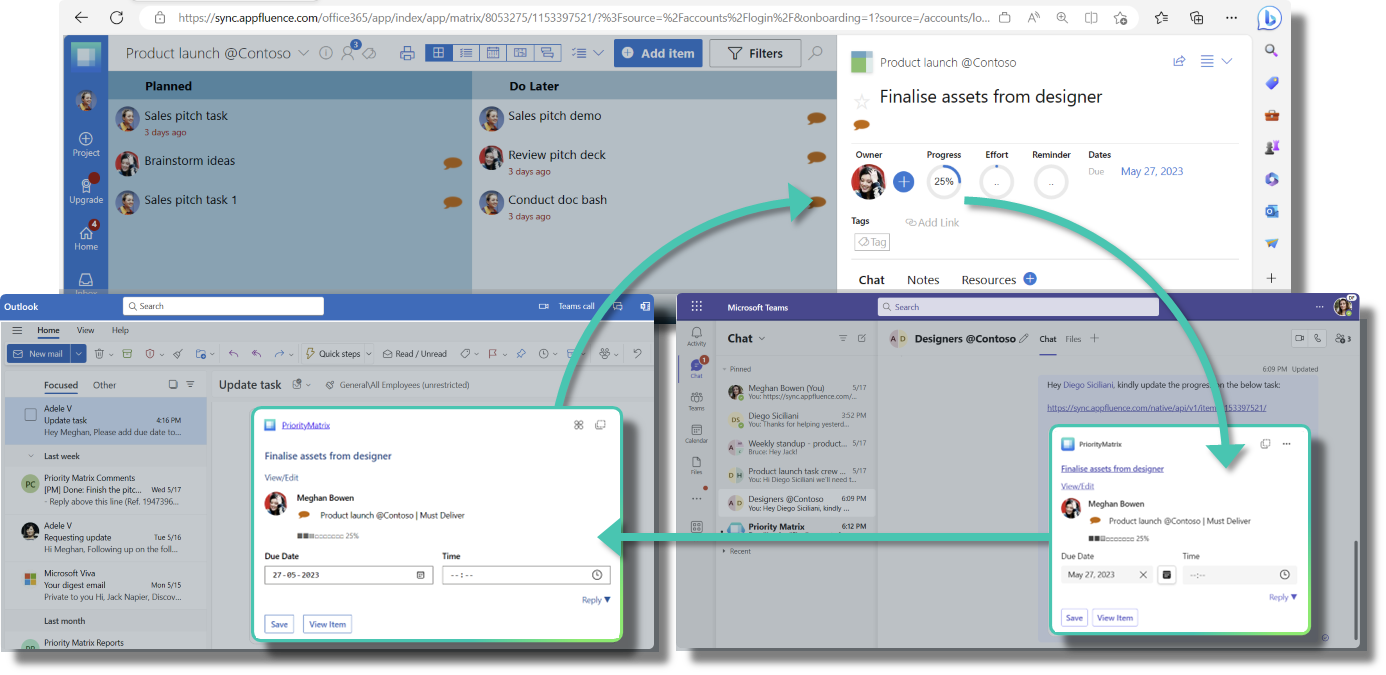 Fig. Adaptive Card-based Loop components let you build experiences which will allow your users to share and act upon business content across Teams and Outlook.
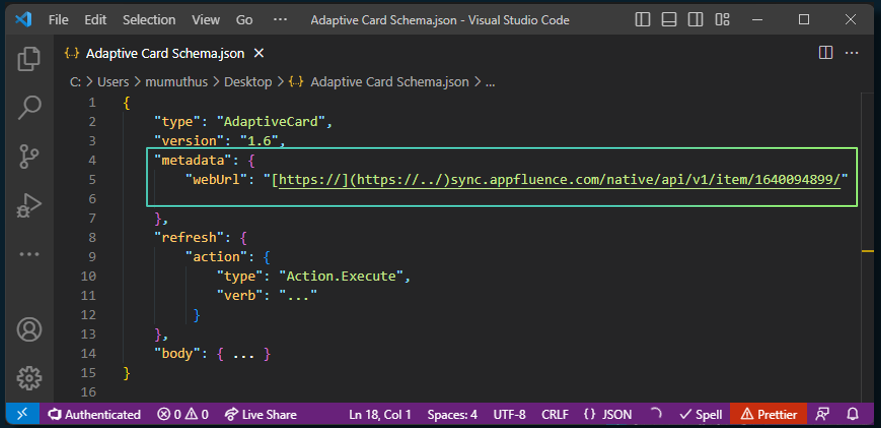 Fig. Add metadata.weburl property to turn your existing Adaptive Card experiences to Loop component Stage 3: The experience In this stage, you are expected to follow the best practices to ensure your end users get the best experience possible through your Loop component keeping up with the live, actionable, and portable promises. In the words of Pablo Diaz-Gutierrez, CTO Priority Matrix, “Our goal is to help our users focus on high-impact tasks. It’s hard to focus on anything if you’re constantly taken in and out of context, and every time a user must switch apps, there’s a cognitive price to pay for the switch. Adaptive Card-based Loop components are an excellent example of how we meet our users where they already are, helping them reduce context switching.” Priority Matrix - a comprehensive task and priority management solution, has empowered its users to collaborate upon tasks more effectively in M365. Priority Matrix tasks exhibit the following properties when rendered as Loop components:
Post Updated on August 29, 2023 at 06:44PM
Thanks for reading
from devamazonaws.blogspot.com
Fig. Adaptive Card-based Loop components let you build experiences which will allow your users to share and act upon business content across Teams and Outlook.
How partners can develop Adaptive Cards as Loop Components
There are three distinct stages in your journey to building Adaptive Card-based Loop components:- The pre-requisites
- The magic ingredient
- The experience
- The first step is to identify the relevant use cases or flows where user productivity can be improved and build a Search-based message extension to support these scenarios.
- Next, you need to add the link unfurling capability to your app. With this, your app can embed relevant information into chats and emails through copy-paste of your links.
- Next, you need to extend the message extension to Microsoft 365 to ensure that your scenarios work across all supported M365 apps. Also, make sure that your Adaptive Card actions work across Teams and Outlook.
Fig. Add metadata.weburl property to turn your existing Adaptive Card experiences to Loop component Stage 3: The experience In this stage, you are expected to follow the best practices to ensure your end users get the best experience possible through your Loop component keeping up with the live, actionable, and portable promises. In the words of Pablo Diaz-Gutierrez, CTO Priority Matrix, “Our goal is to help our users focus on high-impact tasks. It’s hard to focus on anything if you’re constantly taken in and out of context, and every time a user must switch apps, there’s a cognitive price to pay for the switch. Adaptive Card-based Loop components are an excellent example of how we meet our users where they already are, helping them reduce context switching.” Priority Matrix - a comprehensive task and priority management solution, has empowered its users to collaborate upon tasks more effectively in M365. Priority Matrix tasks exhibit the following properties when rendered as Loop components:
- Live: When a Loop component loads, it shows fresh, up to date information about a task.
- Embeddable: Content is shown in different contexts with equivalent functionality but native feel.
- Actionable: Users can not only view information, but also interact with tasks without leaving the current app. Moreover, users can launch the Priority Matrix web experience natively using the Stage View functionality in Teams and Outlook.
- Portable: Users can copy and paste content across supported apps and all instances stay in sync.
AC-based Loop components empower users and are easy to build
Working with your team can be hard when you have different goals and schedules and the team is distributed across different locations. Loop components make it easy to share and edit content from different apps and sources in Teams chat and Outlook messages. No more switching between apps to find what you need. Just look at the Loop component and reply right away. It's fast and simple! If you are interested in building Loop components for your application, follow these steps:- Create a Microsoft 365 developer tenant or sign in with your test tenant credentials.
- Enable Targeted Release for everyone.
- Send an email from the tenant admin account to AC loops Dev Preview Help. Microsoft will verify the admin user and enable support for Loop components for this tenant.
Post Updated on August 29, 2023 at 06:44PM
Thanks for reading
from devamazonaws.blogspot.com

Comments
Post a Comment