[MS] Dev Proxy v0.18 with reporters, better CI support, and improved Azure API Center integration - devamazonaws.blogspot.com
Achieve more with APIs in your organization. We’re excited to share with you a new version of Dev Proxy that helps you to build robust apps connected to APIs. In this version:
Post Updated on May 30, 2024 at 08:23AM
Thanks for reading
from devamazonaws.blogspot.com
- Get better reports with Reporters
- Easily integrate Dev Proxy in CI/CD scenarios
- Improved Azure API Center integration
- Improved OpenAPI spec generation
- Improved console output
- ...and more!
Get better reports with Reporters
In the previous versions of Dev Proxy, each plugin produced its own output. For example, the Execution Summary Plugin produced a markdown report, and the Minimal Permission Plugin produced plain-text output. All output was printed to the console. This was limiting, specifically in integration scenarios when you wanted to use plugin output for further processing and had to not only intercept the output but also scrape the relevant portion of it. In this release, we introduce Reporters: a new sort of plugin capable of turning structured output from plugins into a specific format, such as markdown or JSON. Plugins that process recorded requests, next to standard console output, produce now an object with a report of their output. One or more reporters can then take this report and convert it into a specific format. Here’s an example of the Markdown reporter being used in combination with the Azure API Center Onboarding Plugin to report on shadow APIs: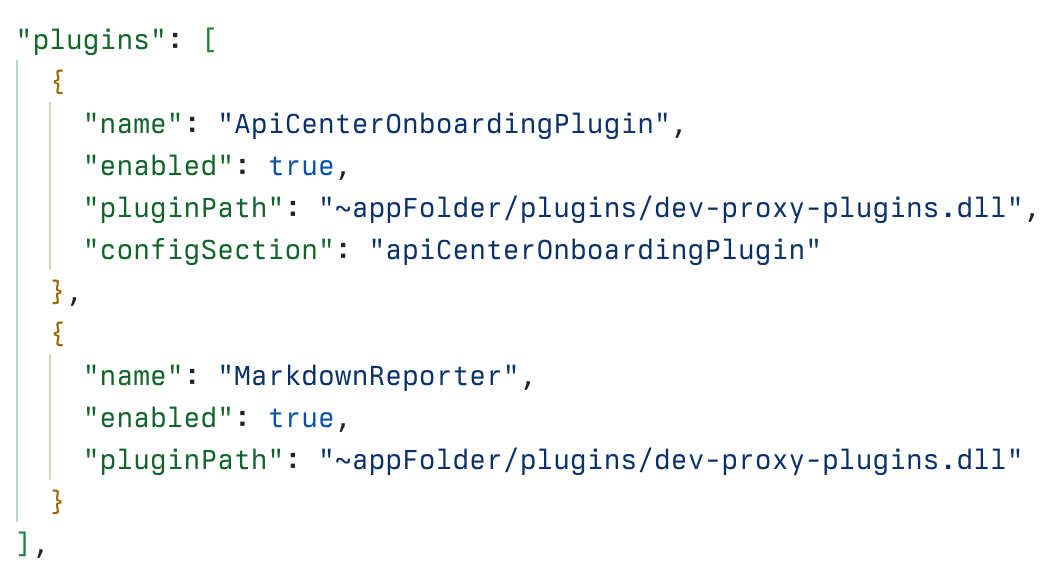 Dev Proxy configuration including the ApiCenterOnboardingPlugin and the MarkdownReporter
 GitHub workflow log showing the step of writing the API Center onboarding report to the job summary
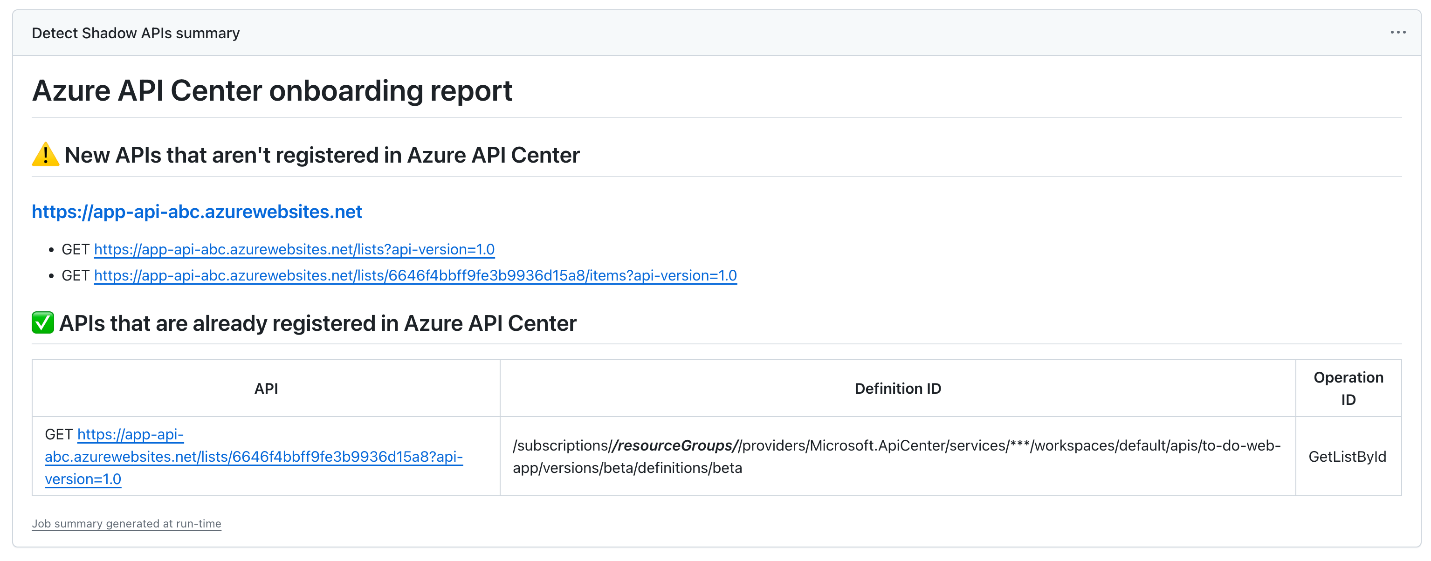 Dev Proxy API Center onboarding report displayed in GitHub job summary
Easily integrate Dev Proxy in CI/CD scenarios
Dev Proxy is a great tool that lets you easily simulate different API scenarios on your machine. But it gets even more powerful when integrated with your CI/CD setup for continuous analysis! Recently, we’ve been researching several CI/CD integration scenarios for Dev Proxy, such as:- Detect shadow APIs, in combination with Azure API Center
- Detect non-production APIs in combination with Azure API Center
- Verify that your app uses minimal Microsoft Graph permissions
Non-interactive mode
When you start Dev Proxy in a CI/CD environment, as detected by checking for the presence of the CI environment variable, it now runs in a non-interactive mode. This means that it doesn't wait for you to press any key. This is important, because it now allows you to gracefully close Dev Proxy using SIGINT. When you close Dev Proxy by sending SIGINT, you stop recording and let recording plugins process recorded requests and produce output. In comparison, if you close Dev Proxy forcefully by sending a SIGKILL, it stops immediately. This feature is fundamental for letting you use recording and analyzing recorded requests in CI/CD scenarios. You need recording for scenarios such as detecting minimal Microsoft Graph permissions, detecting APIs onboarded in Azure API Center, or generating an OpenAPI spec.Reading Azure API Center plugins configuration from environment variables
When using Dev Proxy plugins for Azure API Center integration, you need to specify several values such as subscription ID or API Center instance name. If you want to keep these values private, you can now define them as secrets in your repository. Then, in your workflow, you can map them to environment variables. In Dev Proxy configuration, rather than specifying the values, you specify the names of the environment variables. When connecting to API Center, Dev Proxy retrieves the values from environment variables, keeping them private.Markdown and JSON reporters
We’ve just mentioned the new Reporters that we introduce in this version. We believe that Markdown and JSON reporters are key for CI/CD integration. Markdown reporters give you ready-to-use content that you can put in your workflow summary. If you need to do some additional processing, such as creating issues or submitting PRs, you can use JSON reports produced by the JSON reporter. JSON reports contain structured data which you can easily process using tools such as jq or directly in PowerShell.Improved Azure API Center integration
Azure API Center helps you catalog APIs that you use in your organization. Using API Center, you create a single location to keep track of which APIs you use, where they’re located and documented, and who their owner is. API Center also allows you to validate APIs against your organizational rules so that you can stay compliant. In the previous version of Dev Proxy, we introduced two Azure API Center plugins that help you track the usage of APIs in your apps:- API Center Onboarding Plugin, which checks if APIs used in your app are registered in API Center (shadow API discovery)
- API Center Production Version Plugin, which checks if your app uses production-level APIs
Improved OpenAPI spec generation
APIs are becoming more and more important. Especially in this era of AI, where APIs are the gateway to organizational data and insights, having well-designed and described APIs is necessary for you to benefit from the latest advancements. But what if you don’t have an OpenAPI spec for your APIs? Previously, we introduced the ability for Dev Proxy to generate an OpenAPI spec for your API. All you need to do is start Dev Proxy and call your API. Dev Proxy records the requests and responses and generates an OpenAPI spec for you!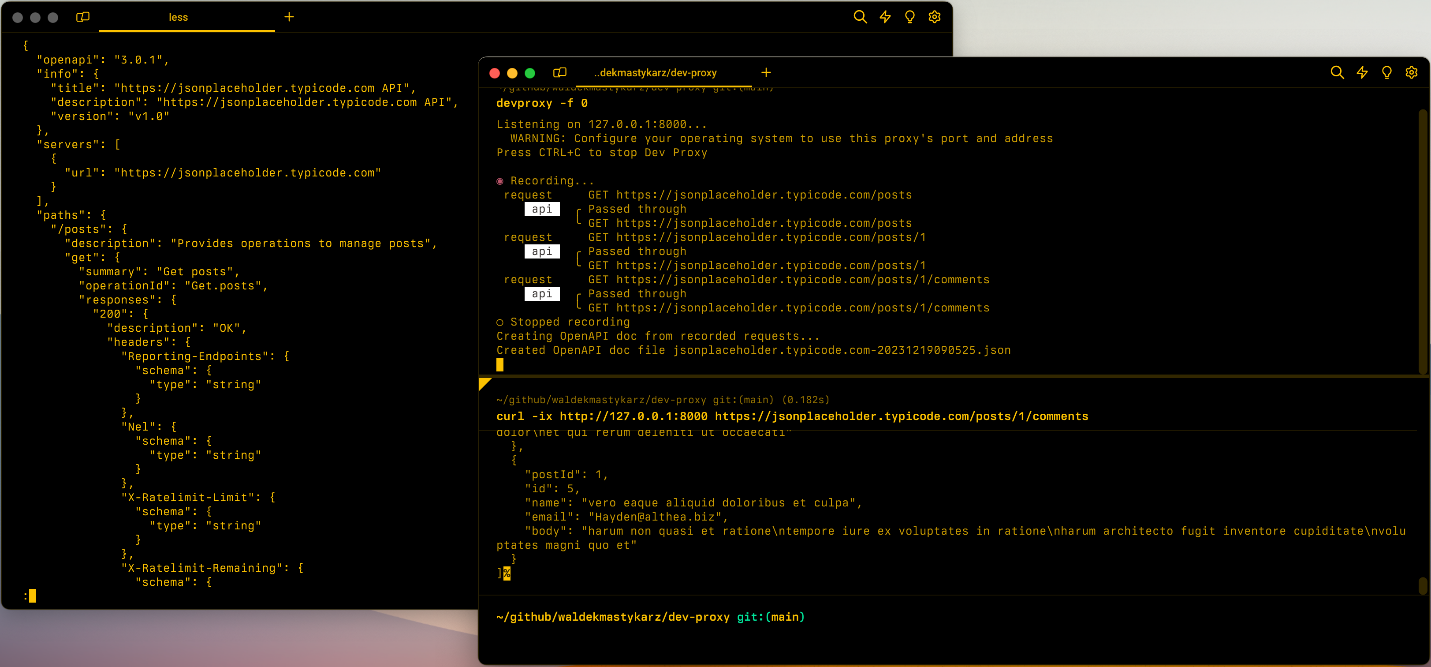 Dev Proxy generating an OpenAPI spec based on intercepted API requests
Improved console output
In this version, we refactored logging to console. The most notable change is that messages related to the same request are now grouped, so that you no longer need to manually match them together.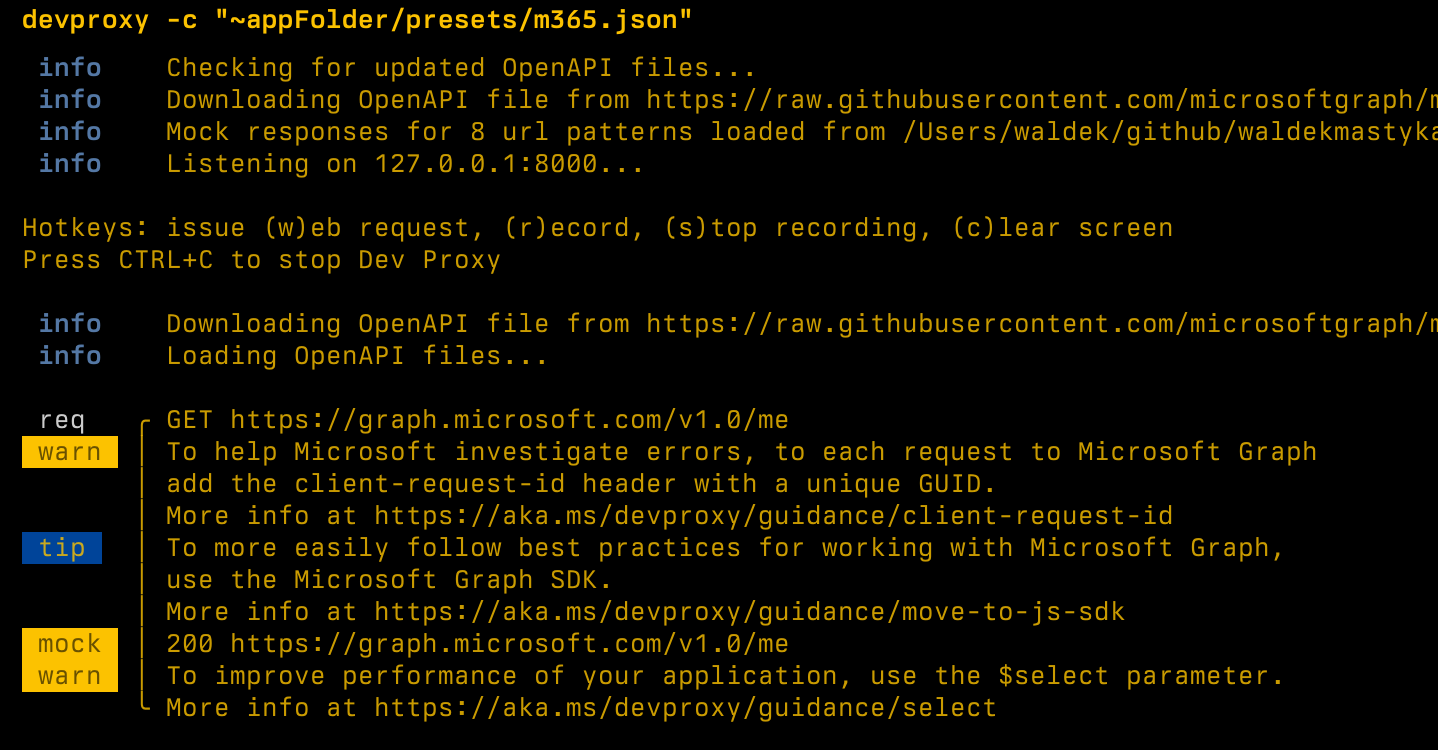 Updated logging to console in Dev Proxy v0.18
Improved Dev Proxy Toolkit
Dev Proxy Toolkit is a Visual Studio Code extension that makes it easy to create and update configuration files. Alongside the new release of Dev Proxy, we’ve also released a new version of the toolkit, v0.4.0. In this version:- Improved flow for installing Dev Proxy
- Updated snippets to use the latest schema
- Bug fixes
Dev Proxy at the European Collaboration Summit and Build 2024
In May, there were two big conferences: the European Collaboration Summit and of course, Microsoft Build. At both conferences we had the opportunity to showcase Dev Proxy and how it helps you build better apps.European Collaboration Summit
In the session, Build apps that don’t fail in production, Garry Trinder demonstrated how Dev Proxy can help developers build more resilient applications by improving robustness, performance and security. The session was packed full of demos, starting with the basics of installing, configuring and running Dev Proxy on Windows, then showing how to simulate API errors and behaviors like throttling. Next, how to use presets, like the preset designed specifically for Microsoft 365 app development like mocking Microsoft Graph responses and checking whether applications are using the correct permission scopes. And finally, how you can simulate CRUD APIs to speed up development that relies on APIs that are in the process of being updated, or even have not yet been built.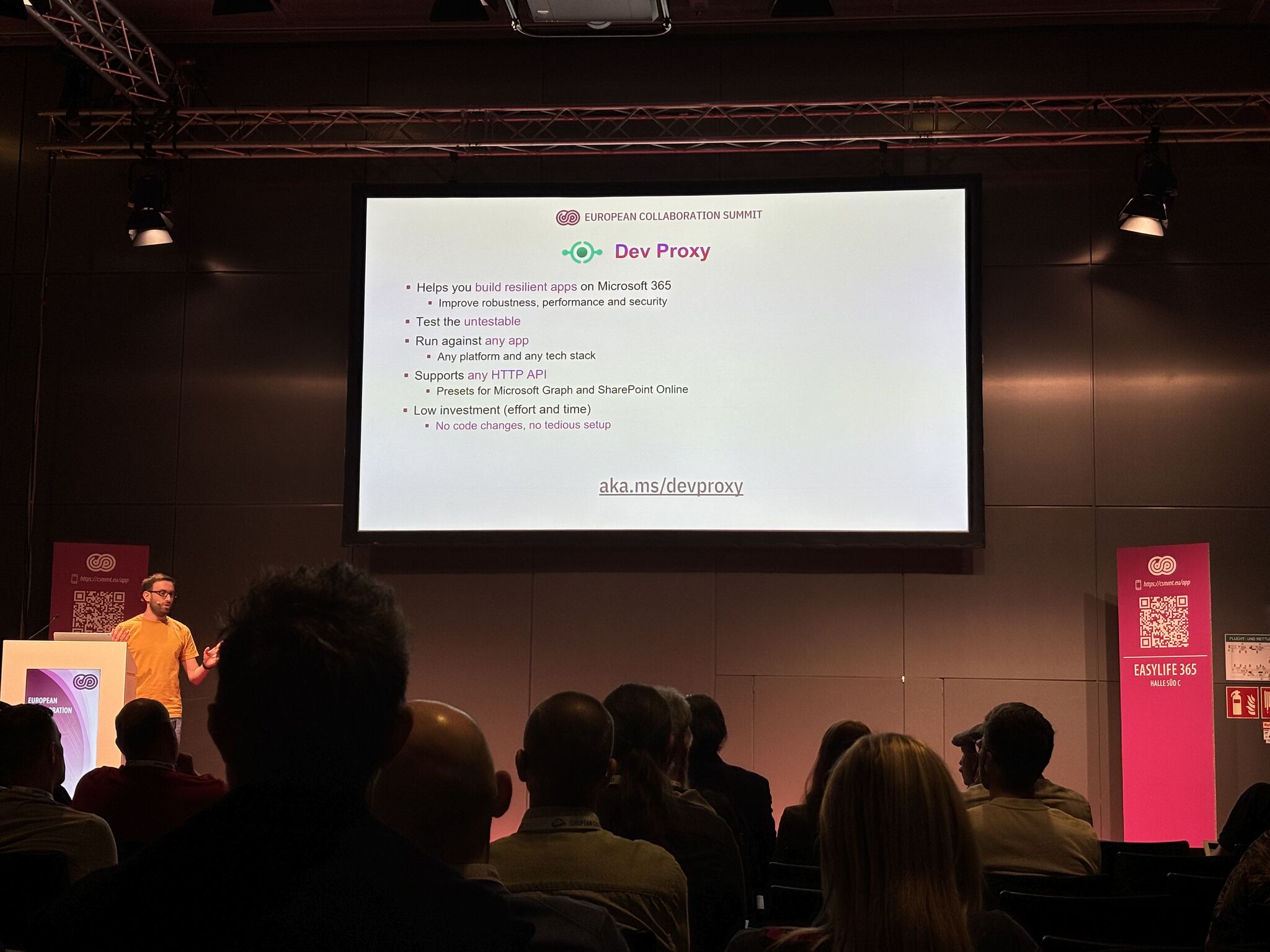 Garry Trinder on stage at European Collaboration Summit in Wiesbaden, Germany.
Photo: SeyedMojtaba SeyedHosseini
Thank you to everyone who attended the session and shared their insights and feedback with us. Your feedback is invaluable.Microsoft Build
First, Bob German and David Rousset delivered a deep dive on building plugins for Microsoft Copilot. Along with some invaluable tips and tricks they showed how you can use Dev Proxy to generate an OpenAPI spec for your API and speed up building Copilot plugins for your existing APIs. Then, Mark Weitzel, in his session about platform engineering, showed an awesome demo of combining GitHub Copilot, Azure API Center, Dev Proxy, Playwright and GitHub Actions to discover shadow APIs! Check out both sessions for more information and demos.Try it now
Download Dev Proxy v0.18 today and build better apps connected to APIs! Thanks to Stephan van Rooij for his invaluable help in improving Dev Proxy logging and feedback on Dev Proxy architecture. Thanks to Elio Struyf for his exploration of integrating Dev Proxy in CI/CD scenarios and integration with Playwright. Thanks to Ramesh Adhikari for improving logging in Dev Proxy. Have any questions, feedback, or suggestions? Join us on Discord. We can’t wait to see what you create with Dev Proxy! Follow us on X (Twitter) / @Microsoft365Dev and subscribe to our YouTube channel to stay up to date on the latest developer news and announcements.Post Updated on May 30, 2024 at 08:23AM
Thanks for reading
from devamazonaws.blogspot.com

Comments
Post a Comment