[MS] Transforming Fleet Operations with vCore-based Azure Cosmos DB for MongoDB Geospatial Capabilities - devamazonaws.blogspot.com
 Efficient fleet management is essential for industries that rely on transportation, such as logistics, delivery services, and public transportation. vCore-based Azure Cosmos DB for MongoDB supports enabling developers to create sophisticated geo-enabled applications with ease. Organizations can streamline fleet operations, monitor vehicle locations in real-time, and optimize routes for enhanced efficiency.
Scenario: Streamlining Fleet Operations
Imagine you are responsible for managing a fleet of vehicles in a logistics company. Geospatial data, which includes location coordinates and spatial relationships, is crucial for effective fleet management. It enables you to:- Track Vehicle Locations: Monitor where your vehicles are at any given time.
- Optimize Routes: Find the best routes to improve delivery times and reduce fuel costs.
- Monitor Fleet Efficiency: Analyze data to make informed decisions and improve operational efficiency.
- Respond to Real-Time Events: Quickly locate vehicles in case of emergencies or changes in plans.
Data Format
Consider a fleet of vehicles, each transmitting location coordinates periodically. We will use a JSON object to represent a vehicle's location as a "Point" on Earth's surface, including a timestamp for the last update.{
"vehicle_id": "V1",
"type": "Sedan",
"location": {
"type": "Point",
"coordinates": [
-84.37685835556678,
33.72763398775282
]
},
"timestamp": "2024-05-09T06:01:44.078110"
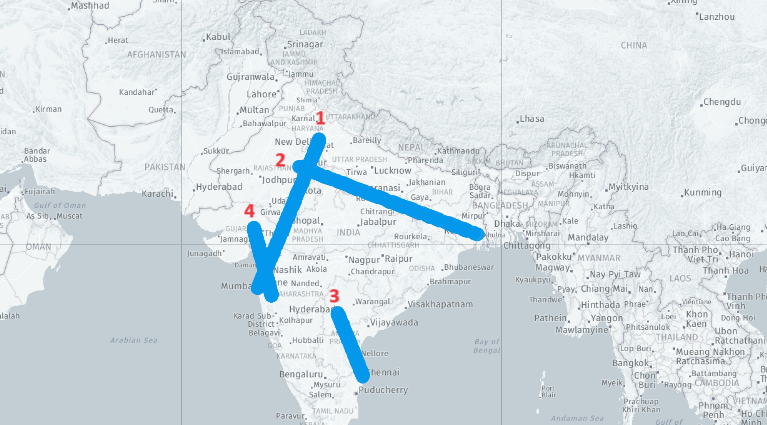
}- Delhi to Mumbai
- Jaipur to Kolkata
- Hyderabad to Chennai
- Ahmedabad to Pune
Exploring Data
To ensure efficient query performance, let us create a 2dsphere index on the "fleet" collection:db.fleet.createIndex({ "location": "2dsphere" })Track the latest location of Vehicles
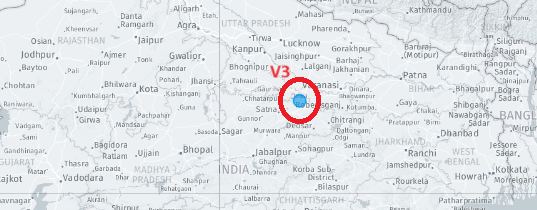
You can retrieve the most recent location of any vehicle using the query provided below. In this example, we demonstrate how to get the latest location for vehicle_id = V3. However, the same approach can be applied to obtain information for any other specific vehicle or for all vehicles in your fleet.db.fleet.aggregate([
{
"$match": {
"vehicle_id": "V3"
}
},
{
"$sort": {
"timestamp": -1
}
},
{
"$group": {
"_id": "$vehicle_id",
"latest_record": {
"$first": "$$ROOT"
}
}
},
{
"$replaceRoot": {
"newRoot": "$latest_record"
}
}
])[
{
_id: ObjectId("668bc073f288fdc0919e6daf"),
vehicle_id: 'V3',
type: 'Van',
location: {
type: 'Point',
coordinates: [ 81.54067689606191, 24.927085602346466 ]
},
timestamp: '2024-07-09T10:17:50.830400'
}
]
Find all Vehicles on the Jaipur to Kolkata Route
In this case, we are utilizing the $geoWithin operator to identify the vehicles that fall within the bounding box specified by Jaipur and Kolkata.db.fleet.aggregate([
{
"$sort": {
"timestamp": -1
}
},
{
"$group": {
"_id": "$vehicle_id",
"latest_record": {
"$first": "$$ROOT"
}
}
},
{
"$replaceRoot": {
"newRoot": "$latest_record"
}
},
{
"$match": {
"location.coordinates": {
"$geoWithin": {
"$box": [
[75.7873, 22.5726], // Southwest corner (Jaipur)
[88.3639, 26.9124] // Northeast corner (Kolkata)
]
}
}
}
},
{
"$project": {
"vehicle_id": 1,
"_id": 0
}
}
])[ { vehicle_id: 'V7' }, { vehicle_id: 'V1' }, { vehicle_id: 'V3' } ]

Find Vehicles Within a Polygon (Specific Area)
Similarly, the $geoWithin operator can be paired with $polygon to locate all vehicles within the boundary delineated by the polygon.db.fleet.aggregate([
{
"$sort": {
"timestamp": -1
}
},
{
"$group": {
"_id": "$vehicle_id",
"latest_record": {
"$first": "$$ROOT"
}
}
},
{
"$replaceRoot": {
"newRoot": "$latest_record"
}
},
{
"$match": {
"location.coordinates": {
"$geoWithin": {
"$polygon": [
[77.2090, 28.6139], // Delhi
[72.8777, 19.0760], // Mumbai
[78.4867, 17.3850], // Hyderabad
[80.2785, 13.0878], // Chennai
[77.2090, 28.6139] // Closing point
]
}
}
}
}
])[
{
_id: ObjectId("668bc073f288fdc0919e6db2"),
vehicle_id: 'V6',
type: 'Sedan',
location: {
type: 'Point',
coordinates: [ 73.675490313612, 19.155134403709194 ]
},
timestamp: '2024-07-09T10:17:50.830400'
},
{
_id: ObjectId("668bc073f288fdc0919e6db4"),
vehicle_id: 'V8',
type: 'SUV',
location: {
type: 'Point',
coordinates: [ 78.99440743680374, 16.16738620525001 ]
},
timestamp: '2024-07-09T10:17:50.830400'
}
]Find the Nearest Vehicle to a Point
Locate the nearest vehicle to a specific point:db.fleet.aggregate([
{
"$geoNear": {
"near": {
"type": "Point",
"coordinates": [77.2090, 28.6139] // Reference point (longitude, latitude)
},
"distanceField": "distance",
"spherical": true,
"key": "location"
}
},
{
"$sort": {
"distance": 1
}
},
{
"$limit": 1 // Limit to the nearest vehicle
}
])[
{
_id: ObjectId("668bc073f288fdc0919e6b09"),
vehicle_id: 'V5',
type: 'Truck',
location: {
type: 'Point',
coordinates: [ 77.20667999325272, 28.60879114299288 ]
},
timestamp: '2024-07-08T17:17:50.830400',
distance: 611.5587173247432
}
] Conclusion
By leveraging the geospatial capabilities of vCore-based Azure Cosmos DB for MongoDB, you can build sophisticated, data-driven fleet management systems that handle real-time tracking, route optimization, and detailed operational analytics.About Azure Cosmos DB
Azure Cosmos DB is a fully managed and serverless distributed database for modern app development, with SLA-backed speed and availability, automatic and instant scalability, and support for open-source PostgreSQL, MongoDB, and Apache Cassandra. Try Azure Cosmos DB for free here. To stay in the loop on Azure Cosmos DB updates, follow us on X, YouTube, and LinkedIn.Post Updated on July 31, 2024 at 03:00PM
Thanks for reading
from devamazonaws.blogspot.com

Comments
Post a Comment