[MS] Upgrade Your Windows Forms .NET Projects to the Latest .NET Version for Enhanced Security - devamazonaws.blogspot.com
 Each release of .NET introduces a host of new features and bug fixes that enhance both performance and security. To leverage these benefits both service and desktop application developers must upgrade their applications to the latest .NET versions. Just like other developers wanting to take advantage of the latest .NET enhancements, we are actively upgrading the Windows Forms (WinForms) Out-of-Process Designer used for .NET application design. This upgrade will enhance the safety of the Designer and motivate WinForms developers to update their applications for improved security. However, upgrading the WinForms Designer to a newer .NET version means it will no longer support designing forms in projects targeting older unsupported .NET versions. This means developers too will need to update their projects to supported .NET runtimes in order to design their forms in Visual Studio.
It is Time to Upgrade!
Upgrading the WinForms Designer and your applications to newer .NET versions not only enhances security but also improves design-time reliability and performance by leveraging the enhancements available in those .NET versions and referenced NuGet packages. We strongly recommend keeping your applications updated with the latest .NET versions. While the WinForms Designer process is also a .NET application and similar guidance applies, its situation differs. The Designer functions as a platform that must support applications targeting all .NET versions, starting with the version it currently targets. If we retarget the Designer process to .NET 9.0, it will no longer support applications built on earlier .NET versions, disrupting many customers. Therefore, we must carefully choose a .NET version for the Designer that can support the maximum number of projects and applications while still maintaining high security standards. Also we understand that many enterprises choose to target LTS versions for longer support. For these reasons we are choosing our update cadence for the designer to be LTS based. We will target the Designer to the .NET LTS version which is just going out of support. Developers are always encouraged to target their applications to the latest .NET version their organization supports.Beginning with the VS 17.12 Preview 3 release, the WinForms Designer will automatically check your project's target framework version. If it falls below the minimum supported .NET LTS version by the Designer, you will receive a notification displayed prominently in an InfoBar. This feature will keep you informed about your project’s compatibility, allowing easy access to a list of .NET versions and their support status.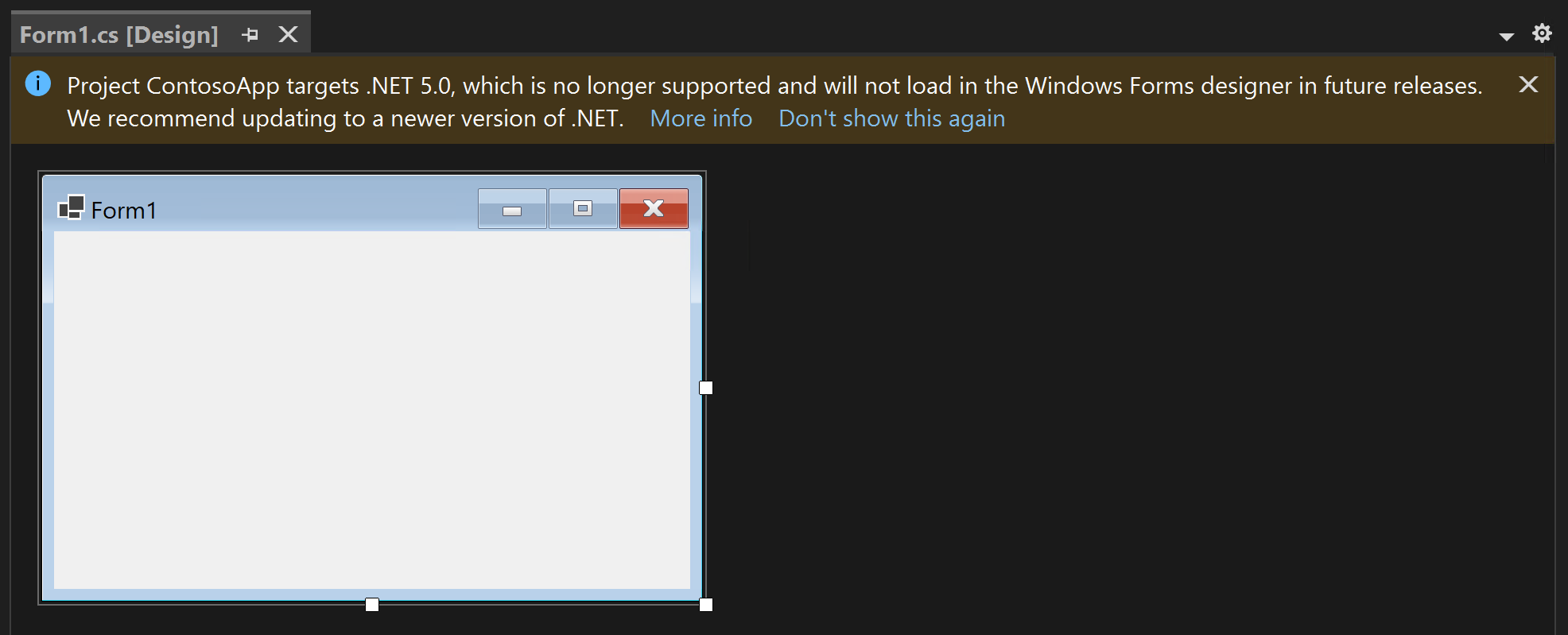
Future Support for WinForms Designer with respect to .NET Runtimes
Each time a .NET LTS release reaches its end of support, the next Visual Studio release will update the WinForms Out-of-Process Designer to target that LTS release. For example, when .NET 6.0 LTS goes out of support in November 2024, the following Visual Studio release, 17.13, will retarget the Designer process to .NET 6.0. Consequently, projects targeting .NET versions below 6.0, such as .NET Core 3.1 and .NET 5.0, will no longer load in the Designer. Hence, we highly recommend upgrading your application to the latest .NET release to remain compatible with Visual Studio 17.13 or newer versions. You can use Designer in Visual Studio 17.12 to migrate. For more information refer to VS Product Life Cycle and Servicing wiki. For Visual Studio 17.13, we will not target the next supported LTS version, 8.0, nor will we follow this policy for non-LTS releases like 7.0, to allow enterprises and developers sufficient time to test and deploy their next updates. The following table outlines the WinForms Designer support policy going forward. While it currently focuses on .NET 6.0 and .NET 8.0, the same pattern will apply to future .NET LTS releases.| .NET LTS Release | End of support (E) | WinForms Designer support policy for next VS release after (E) |
| 6.0 | Nov 2024 | - Designer will support projects targeting .NET 6.0 and newer versions. - Versions below 6.0 will not be supported. |
| 8.0 | Nov 2026 | - Projects targeting .NET 8.0 and newer versions will be supported. - Versions below 8.0 will not be supported. |
Conclusion and call for feedback
In today’s rapidly evolving landscape, prioritizing security in software development is essential, and it requires the commitment of all developers. The WinForms Designer team is dedicated to improving security, but we need your collaboration to ensure that projects remain updated with the latest .NET versions. While this may feel like a significant change, it is a necessary step toward enhancing the security of the WinForms Designer and your applications. We appreciate the time you’ve spent reporting issues/suggestions and hope you continue to give us feedback when using Visual Studio on what you like and what we can improve. Your feedback is critical to help us make Visual Studio the best tool it can be! You can share feedback with us via Developer Community: report any bugs or issues via report a problem and share your suggestions for new features or improvements to existing ones. Stay connected with the Visual Studio team by following us on YouTube, Twitter, LinkedIn, Twitch and on Microsoft Learn.Post Updated on October 24, 2024 at 01:00PM
Thanks for reading
from devamazonaws.blogspot.com

Comments
Post a Comment