[MS] Meet the DocumentDB Extension for VS Code and DocumentDB Local — A Fast, Friendly Way to Work with DocumentDB, Locally and Beyond - devamazonaws.blogspot.com
Say hello to the new DocumentDB extension for Visual Studio Code—an efficient open-source database tool that brings your MongoDB API and DocumentDB databases right into your editor. Designed for developers building cloud apps, working in hybrid or local setups, or debugging live production systems, this extension lets you browse, manage, and query your data directly from VS Code with ease.  DocumentDB, Now Seamlessly Integrated into VS Code With the DocumentDB extension installed you can browse collections, inspect documents, run queries, and even make quick data edits, all from a clean, native experience in VS Code. 🔍 Key capabilities: Universal MongoDB and Azure Cosmos DB for MongoDB Support Seamless Connectivity Across Environments Effortlessly connect to any MongoDB or DocumentDB compatible instance, whether it's hosted in the cloud or in a hybrid setup, on-premises infrastructure, or even on your local machine. Flexible Connection Options Use a simple connection string or browse and authenticate through your cloud provider's native experience. Whether you're connecting to a development cluster or a production-grade database, setup is quick and intuitive. Cross-Platform Service Discovery Automatically discover MongoDB and DocumentDB instances across your cloud subscriptions and regions, making it easier than ever to manage databases across environments. Broad API Compatibility Supports all MongoDB compatible and Azure Cosmos DB for MongoDB databases, ensuring you can work across different providers and versions without changing your workflow. Built for Developer Productivity Optimized for VS Code Designed to reduce friction and boost productivity, the extension works right within VS Code no additional tools or setup required. Versatile Data Views Explore your data in multiple formats:
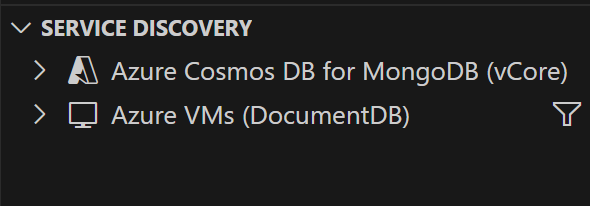
 To get started with DocumentDB on your local machine, refer to the setup guide available here. Cross-Platform Service Discovery: Seamlessly connect to both Azure Cosmos DB for MongoDB and native MongoDB or DocumentDB instances , whether hosted on-premises or by any cloud provider enabling unified access, discovery, and integration across environments.
  Quick Start Getting started is easy:
Post Updated on May 23, 2025 at 05:00PM
Thanks for reading
from devamazonaws.blogspot.com
DocumentDB, Now Seamlessly Integrated into VS Code With the DocumentDB extension installed you can browse collections, inspect documents, run queries, and even make quick data edits, all from a clean, native experience in VS Code. 🔍 Key capabilities: Universal MongoDB and Azure Cosmos DB for MongoDB Support Seamless Connectivity Across Environments Effortlessly connect to any MongoDB or DocumentDB compatible instance, whether it's hosted in the cloud or in a hybrid setup, on-premises infrastructure, or even on your local machine. Flexible Connection Options Use a simple connection string or browse and authenticate through your cloud provider's native experience. Whether you're connecting to a development cluster or a production-grade database, setup is quick and intuitive. Cross-Platform Service Discovery Automatically discover MongoDB and DocumentDB instances across your cloud subscriptions and regions, making it easier than ever to manage databases across environments. Broad API Compatibility Supports all MongoDB compatible and Azure Cosmos DB for MongoDB databases, ensuring you can work across different providers and versions without changing your workflow. Built for Developer Productivity Optimized for VS Code Designed to reduce friction and boost productivity, the extension works right within VS Code no additional tools or setup required. Versatile Data Views Explore your data in multiple formats:
- Table View for quick insights
- Tree View for hierarchical exploration
- JSON View for detailed document structure All views support smooth pagination for large datasets.
- Syntax highlighting
- Auto-complete for operators and collection names
- Intelligent field name suggestions based on your schema
To get started with DocumentDB on your local machine, refer to the setup guide available here. Cross-Platform Service Discovery: Seamlessly connect to both Azure Cosmos DB for MongoDB and native MongoDB or DocumentDB instances , whether hosted on-premises or by any cloud provider enabling unified access, discovery, and integration across environments. Quick Start Getting started is easy:
- Search for DocumentDB in the VS Code Extensions Marketplace or install it here
- Open the new DocumentDB tab in your sidebar
- Add a connection string (MongoDB or Azure Cosmos DB with MongoDB)
- Explore, query, and manage your data , no setup headaches
- Announcements – Updates on releases, new features, and upcoming plans.
- Ideas – Suggest new features or improvements.
- General – Ask questions and discuss anything about the extension.
Leave a review
Tell us about your Azure Cosmos DB experience! Leave a review on PeerSpot and we’ll gift you $50. Get started here.About Azure Cosmos DB
Azure Cosmos DB is a fully managed and serverless NoSQL and vector database for modern app development, including AI applications. With its SLA-backed speed and availability as well as instant dynamic scalability, it is ideal for real-time NoSQL and MongoDB applications that require high performance and distributed computing over massive volumes of NoSQL and vector data. To stay in the loop on Azure Cosmos DB updates, follow us on X, YouTube, and LinkedIn.Post Updated on May 23, 2025 at 05:00PM
Thanks for reading
from devamazonaws.blogspot.com

Comments
Post a Comment