[MS] Simplifying Resource Management in mssql-python through Context Manager - devamazonaws.blogspot.com
 Reviewed by: Sumit Sarabhai and Gaurav Sharma If you’ve worked with databases in Python, you know the boilerplate: open a connection, create a cursor, run queries, commit or rollback transactions, close cursors and connection. Forgetting just one cleanup step can lead to resource leaks (open connections) or even inconsistent data. That’s where context managers step in. We’ve introduced context manager support in mssql‑python driver, enabling Python applications to interact with SQL Server and Azure SQL more safely, cleanly, and in a truly Pythonic way. [alert type="important" heading="Try it here"] You can install driver using pip install mssql-python Calling all Python + SQL developers! We invite the community to try out mssql-python and help us shape the future of high-performance SQL Server connectivity in Python.![/alert] Why Context Managers? In Python, the
 with statement is syntactic sugar for resource management. It actively sets up resources when you enter a block and automatically cleans them up when you exit — even if an exception is raised. Think of it as hiring a helper:
- They prepare the workspace before you begin.
- They pack everything up when you’re done.
- If something breaks midway, they handle the cleanup for you.
from mssql_python import connect

conn = connect(connection_string)
cursor = conn.cursor()

try:
    cursor.execute("SELECT * FROM users")
    for row in cursor:
        print(row)
finally:
    cursor.close()
    conn.close()
close() somewhere, and you have a resource leak. That's where Python’s with statement — the context manager — comes to the rescue. mssql_python not only supports it for connections but also for cursors, which makes resource management nearly effortless. Using Context Managers with Connections Now comes the real magic — connection-level context managers. When you wrap a connection in a with block, several things happen under the hood:
- If everything succeeds, the transaction is committed.
- If an exception occurs, the transaction is rolled back.
- The connection is always closed when leaving the block.
from mssql_python import connect

with connect(connection_string) as conn:
    cursor = conn.cursor()
    cursor.execute("INSERT INTO users (name) VALUES ('Alice')")
    # If no exception → commit happens automatically
    # If exception → rollback happens automatically
# Connection is closed automatically hereconn = connect(connection_string)
try:
cursor = conn.cursor()
cursor.execute("INSERT INTO users (name) VALUES ('Alice')")
if not conn.autocommit:
conn.commit()
except:
if not conn.autocommit:
conn.rollback()
raise
finally:
conn.close()- Entering the block
- Connection is opened and assigned to conn.
- All operations inside the block run using this connection.
- Exiting the block
- No exception: If
autocommit=False, transactions are committed. - Exception raised: If
autocommit=False, uncommitted changes are rolled back. The exception propagates unless handled.
- No exception: If
- Cleanup: Connection is always closed, preventing resource leaks.
mssql_python now support the with statement. The context here is tied to the cursor resource, not the transaction.
with conn.cursor() as cursor:
    cursor.execute("SELECT * FROM users")
    for row in cursor:
        print(row)
# Cursor is automatically closed here- Entering the block: A new cursor is created.
- Inside the block: All SQL statements execute using this cursor.
- Exiting the block: The cursor is automatically closed — no need to call
cursor.close()manually. - Transactions: The cursor itself doesn’t manage transactions. Commit/rollback is controlled by the connection.
- If
autocommit=False, changes are committed or rolled back at the connection level. - If
autocommit=True, each statement is committed immediately as it executes.
- If
cursor = conn.cursor()
try:
    cursor.execute("SELECT * FROM users")
    for row in cursor:
        print(row)
finally:
    cursor.close()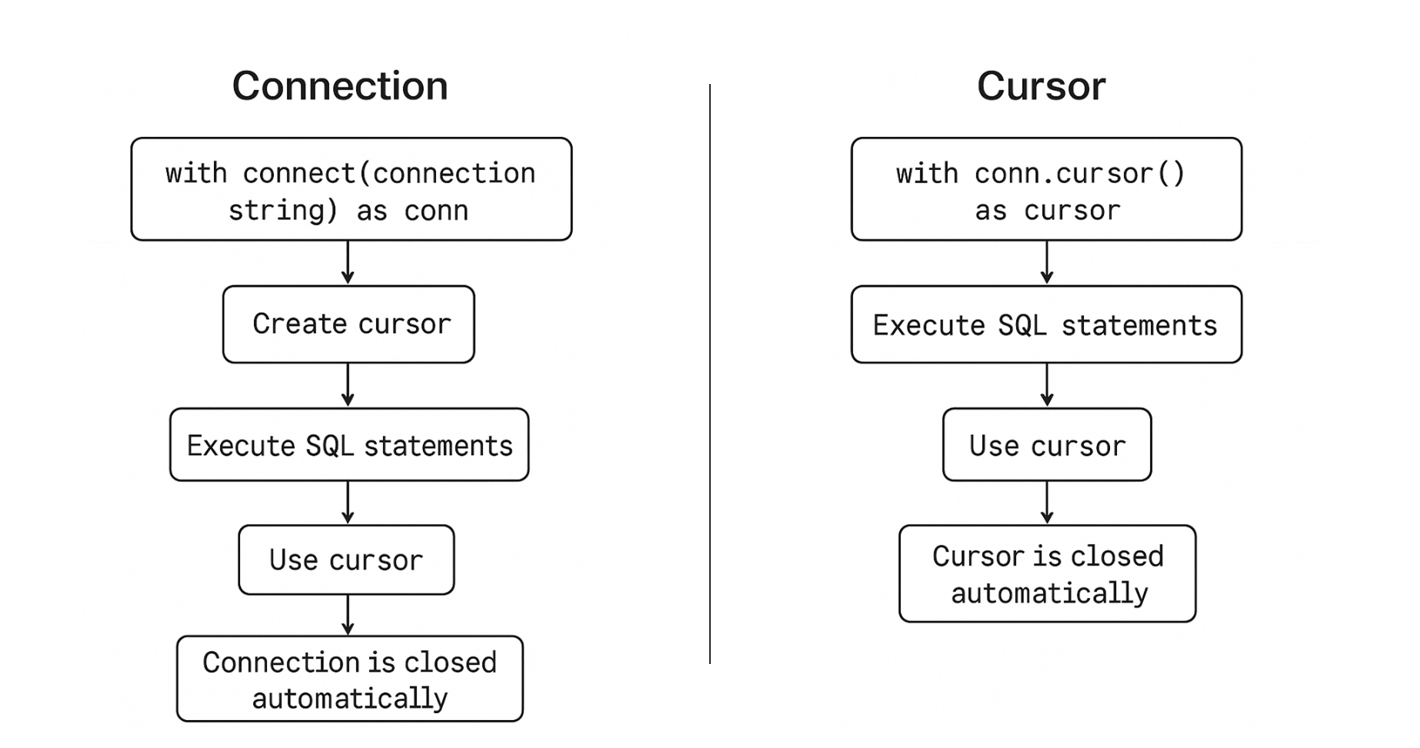
Image 1: Workflow of Context Manager in Connections and Cursor
Practical Examples Example 1: Safe SELECT Querieswith connect(connection_string) as conn:
with conn.cursor() as cursor:
cursor.execute("SELECT * FROM users WHERE age > 25")
for row in cursor:
print(row)
# Cursor closed, connection still open until block ends
# Connection is closed with connect(connection_string) as conn:
with conn.cursor() as cursor:
cursor.execute("INSERT INTO users (name) VALUES ('Bob')")
cursor.execute("UPDATE users SET age = age + 1 WHERE name = 'Alice'")
# Everything committed automatically if no exceptiontry:
with connect(connection_string) as conn:
with conn.cursor() as cursor:
cursor.execute("INSERT INTO users (name) VALUES ('Charlie')")
# Simulate error
raise ValueError("Oops, something went wrong")
except ValueError as e:
print("Transaction rolled back due to:", e)
# Connection closed automatically, rollback executeddef add_user(name):
with connect(connection_string) as conn:
with conn.cursor() as cursor:
cursor.execute("INSERT INTO users (name) VALUES (?)", (name,))- Guarantees commit/rollback automatically.
- No open connections piling up.
- Clean, readable, and safe code for high-traffic scenarios.
with connect(connection_string) as conn:
    with conn.cursor() as cursor:
        cursor.execute("INSERT INTO archive_users SELECT * FROM users WHERE inactive=1")
cursor.execute("DELETE FROM users WHERE inactive=1")- If any statement fails, rollback happens automatically.
- Prevents partial migration, keeping data consistent.
with connect(connection_string) as conn:
    with conn.cursor() as cursor:
        cursor.execute("SELECT COUNT(*) FROM users")
        user_count = cursor.fetchone()[0]
        cursor.execute("SELECT department, COUNT(*) FROM employees GROUP BY department")
        for row in cursor:
print(row)- Cursors closed automatically after each block.
- Makes scripts modular and maintainable.
def transfer_funds(from_account, to_account, amount):
    with connect(connection_string) as conn:
        with conn.cursor() as cursor:
            cursor.execute("UPDATE accounts SET balance = balance - ? WHERE id=?", (amount, from_account))
cursor.execute("UPDATE accounts SET balance = balance + ? WHERE id=?", (amount, to_account))- Automatic rollback on failure ensures money isn’t lost or double-counted.
- Eliminates verbose error-handling boilerplate.
with connect(connection_string) as conn:
    with conn.cursor() as cursor:
        cursor.execute("SELECT AVG(salary) FROM employees")
print("Average salary:", cursor.fetchone()[0])- Perfect for quick queries.
- No forgotten
close()calls. - Encourages clean, reusable query blocks.
mssql_python, we’ve brought that simplicity to SQL Server interactions with python apps making lives of the developers easier. Next time you’re working with mssql_python, try wrapping your connections and cursors with with. You’ll write less code, make fewer mistakes, and your future self will thank you. Whether it’s a high-traffic web application, an ETL script, or exploratory analysis, context managers simplify life, make code safer, and reduce errors. Remember, context manager will help you with:
- Less boilerplate code: No longer try-finally for cursors or connections.
- Automatic transaction management: Commit or rollback is handled based on success or failure.
- Safe resource cleanup: Prevents resource leaks with automatic closing.
- Readable and Pythonic: Nested with blocks clearly show the scope of cursor and connection usage.
- Check-out the mssql-python driver and integrate it into your projects.
- Share your thoughts: Open issues, suggest features, and contribute to the project.
- Join the conversation: GitHub Discussions | SQL Server Tech Community.
Post Updated on September 26, 2025 at 10:49AM
Thanks for reading
from devamazonaws.blogspot.com

Comments
Post a Comment