[MS] How we built the Microsoft Learn MCP Server - devamazonaws.blogspot.com
When we launched the Microsoft Learn Model Context Protocol (MCP) Server in June 2025, our goal was simple: make it effortless for AI agents to use trusted, up-to-date Microsoft Learn documentation. GitHub Copilot and other agents are increasingly common, and they need to be able to ground responses just like humans with browsers do. Learn MCP Server is a remote server that exposes agent-friendly tools over Streamable HTTP Transport, backed by the same Learn knowledge service described in How we built “Ask Learn”.
Why MCP and why Learn MCP Server?
Modern AI agents can discover and use tools dynamically through Model Context Protocol, a standard that lets agents negotiate capabilities at runtime, stream results, and adapt as tools evolve. Instead of manually searching, scraping pages, or maintaining embeddings, clients simply connect to Learn MCP Server, request the list of tools available and invoke tools as the agent decides. VS Code GitHub Copilot and other MCP Clients can deliver accurate guidance for Microsoft technologies, while users benefit from answers backed by official Learn content.
The server presents three tools:
- microsoft_docs_search: returns titles, content sections, and URLs to the source article.
- microsoft_docs_fetch: fetches the full-page article content for additional context.
- microsoft_code_sample_search: optimized for finding code snippets and examples within Learn documentation, enabling agents to retrieve language-specific samples quickly for coding tasks.
Why a server, not another API?
Traditional APIs require every client to develop integrations, including reading documentation, managing authentication, formatting requests, handling errors, and maintaining compatibility as things change. That model doesn’t scale in an ecosystem where dozens of AI agents—each with different capabilities—need to reliably access the same grounding data. MCP takes a fundamentally different approach. Instead of custom REST calls, it provides a standard, agent‑native way for tools to be discovered at runtime. Any MCP‑compatible agent can connect to our remote endpoint, inspect the available tools, understand their schema automatically, and start using them without custom coding. This plug‑and‑play model lets agents adapt to contract changes, reduces breakage, avoids hardcoded integrations, and delivers relevant content simply by pointing to the Learn MCP server.
Architecture in brief
We host a remote MCP server in front of Learn knowledge service. MCP clients connect over Streamable HTTP Transport. We used the official C# SDK for MCP to implement the transport and session handling, hosted on Azure App Service. Learn MCP Server is backed by a content vector store, the same knowledge service powering Ask Learn. This means agents benefit from the same freshness guarantees, relevance ranking, and index coverage that Microsoft uses for RAG-based experiences. Where Ask Learn serves end-user chats directly, Learn MCP Server wraps the knowledge retrieval capability in a standard protocol, making it discoverable and usable by any MCP-compatible agent.
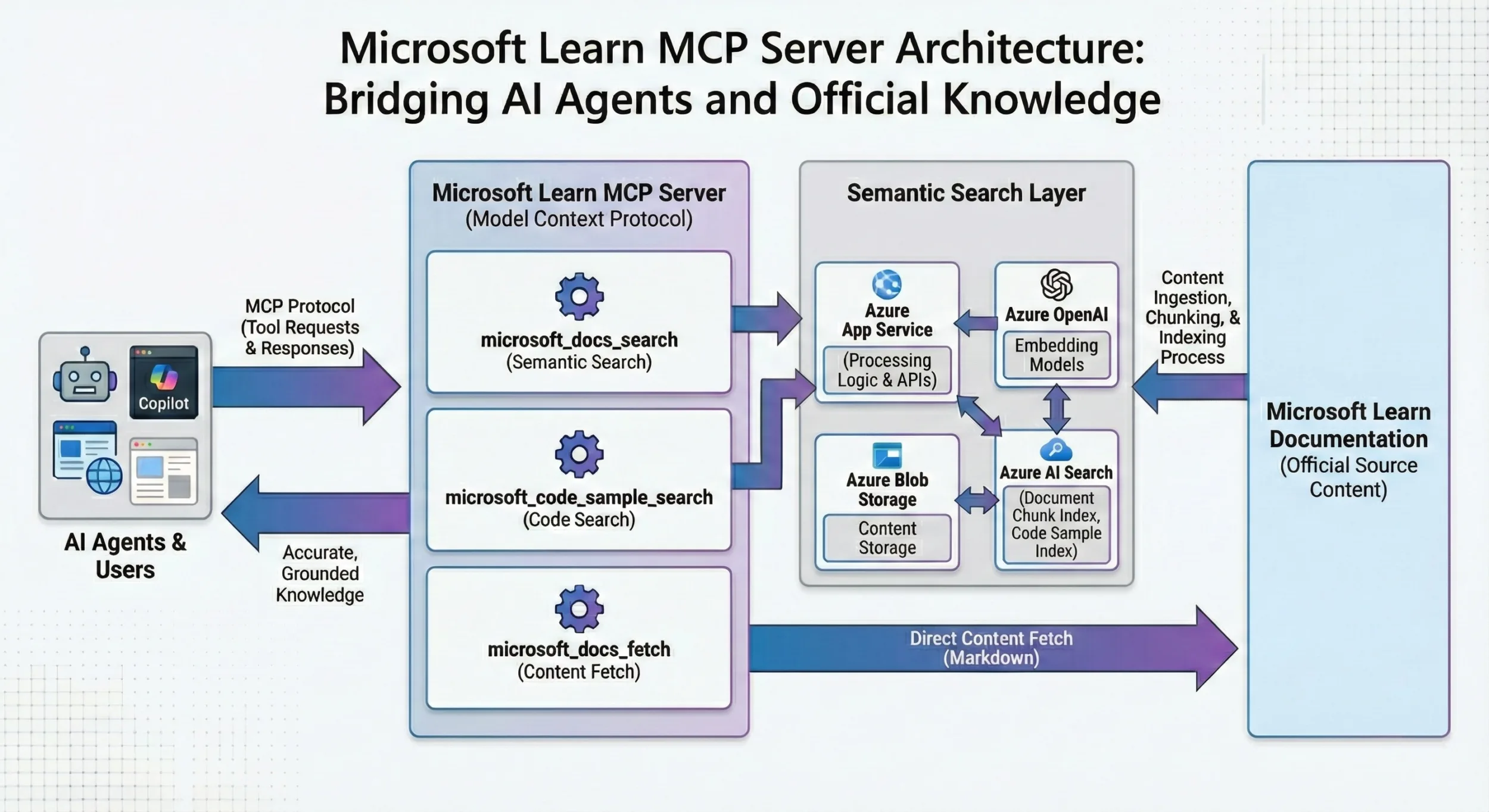
The lessons that follow explain what the Learn team discovered while designing, launching, and now operating the Microsoft Learn MCP Server. These are lessons that speak to the realities of building agent-facing systems at scale and go beyond implementation details. We are sharing not just what was built, but why the decisions we made mattered and what surprised us on this journey. These lessons are reflections of this experience for shaping our approach to tool design, retrieval integration, and protocol-driven product experiences.
Lesson 1 — “Your API is not an MCP tool”
A key principle: design tools for the agent workflow, not to mirror internal APIs. The Learn knowledge service exposes many parameters, including topK, index selection, thresholds, OData filters, and vector vs. hybrid search. Our tools compress this into two intuitive operations (search, fetch) matching the human “search-and-read” pattern that LLM agents naturally follow. We documented this separation explicitly so that future tool additions don’t bleed lower-level retrieval choices into the agent contract.
Lesson 2 — Remote servers behave like distributed systems
Hosting a public MCP server meant dealing with cross-region deployments, dynamic scaling, CORS, session affinity, statelessness, and data-protection concerns. Even though MCP is “just tools over JSONRPC,” operational realities resemble any stateless, multi-region service. We work with MCP C# SDK maintainers to ensure best practices and achieve our own business objectives.
Lesson 3 — Tool descriptions are your agent experience
We learned that tool and parameter descriptions function like user manuals for agents and language models. Small wording changes can swing tool activation rates materially. We built an automated evaluation tool to iterate descriptions based on observed agent behavior and success metrics—then deployed updated descriptions which clients discover at session refresh.
Lesson 4 — Compose tools for better outcomes
Search and fetch work better together. For example, a client can first find the best match and then ground the answer with the full-page Markdown. We tuned the descriptions to explicitly teach this follow-up usage, improving both groundedness and citation quality in downstream agents.
Lesson 5 — Expect (and defend against) hardcoded callers
Even with MCP dynamic tool discovery, some clients still hardcode tool schemas as if they were fixed APIs. When we renamed a parameter from question to query, 2–5% of requests broke until we supported both names (optional) during a deprecation window. Defensive evolution is part of operating a public service. To help the community avoid such pitfalls, Microsoft Research introduced guidance on tool space interference and released MCP Interviewer, which can flag schema and behavioral issues before agents trip over them. We used these learnings when refining our tool contracts.
Lesson 6 — Let data drive iteration
Aggregated usage patterns showed that most requests are related to coding tasks, explaining, and troubleshooting. We prioritized description and retrieval changes against these observed intents to maximize impact. In parallel, the product documentation contains agent instructions that nudge tools to be used when Microsoft technologies are involved—another data-driven change to improve grounding.
What this enables
Previously, an engineer working in a development environment would have to open a browser window, enter a search query, skim search results, open one or more links, read pages to find an answer, and copy that back to the development environment. Now you can add Learn MCP Server to your favorite agent and make it apply Learn content directly from the source straight to your situation.
Connect with us in the Learn MCP Server repository to configure your agent and for more information.
Post Updated on February 11, 2026 at 07:23PM
Thanks for reading
from devamazonaws.blogspot.com
Comments
Post a Comment