[MS] Now Generally Available: Cosmos DB Mirroring in Microsoft Fabric with Private Networks - devamazonaws.blogspot.com
We’re excited to announce the general availability of private network support for Azure Cosmos DB mirroring in Microsoft Fabric, enabling customers to replicate operational data into Fabric from Azure Cosmos DB accounts secured with private endpoints or virtual networks while continuing to operate within their existing network security models. As more organizations connect operational data with analytics and AI to power new insights and intelligent applications, the ability to do so securely has become increasingly important—making private network support a key capability for bringing operational data into Fabric without compromising established security boundaries.
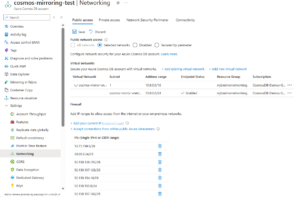 To see these steps in detail, refer to How to: Configure private networks for Azure Cosmos DB Fabric Mirroring. The documentation includes a PowerShell script that can automate the required networking and authorization configuration, allowing you to focus on creating the mirrored database in Fabric. Here are the steps at a high level.
Post Updated on March 16, 2026 at 01:00PM
Thanks for reading
from devamazonaws.blogspot.com
Bringing secured operational data into Fabric
Azure Cosmos DB mirroring makes it easy to continuously replicate operational data into Microsoft Fabric, where it can be used across analytics and AI experiences without building and maintaining custom ingestion pipelines. With private network support now generally available, customers can use mirroring with Cosmos DB accounts that operate within restricted network environments, bringing secured operational data into Fabric while preserving their existing security posture.Get Started by Configuring Mirroring with Private Networks
Configuring mirroring for Cosmos DB accounts that use private endpoints or virtual networks involves a small number of setup steps. To see these steps in detail, refer to How to: Configure private networks for Azure Cosmos DB Fabric Mirroring. The documentation includes a PowerShell script that can automate the required networking and authorization configuration, allowing you to focus on creating the mirrored database in Fabric. Here are the steps at a high level.
- Assign the required RBAC policies for Mirroring.
- Temporarily secure your Cosmos account with required Azure Service Endpoint IPs (or use Network Security Perimeter).
- Configure a Network ACL from your Fabric Workspace to your Cosmos account.
- Create the new Mirrored database in Fabric.
- Restore the original network configuration once setup is complete.
Post Updated on March 16, 2026 at 01:00PM
Thanks for reading
from devamazonaws.blogspot.com
Comments
Post a Comment