[MS] Building a Real-Time Multi-Agent UI with AG-UI and Microsoft Agent Framework Workflows - devamazonaws.blogspot.com
Multi-agent systems demo beautifully. Putting them in front of real users is another story.
In early prototypes, a terminal or a basic chat window is enough. But once agents start handing off to each other, pausing for approvals, or asking follow-up questions, those interfaces fall apart. Which agent is active? Why is the system waiting? What's it about to do on the user's behalf? Without answers to those questions, a multi-agent workflow stops feeling like a product and starts feeling opaque.
This post shows what a better answer looks like. We'll build a customer support workflow that pairs Microsoft Agent Framework (MAF) handoffs with AG-UI, an open protocol for streaming agent execution events to a frontend over Server-Sent Events (SSE). The result is a real-time UI that shows users what's happening, lets them respond when agents need input, and keeps them in control of sensitive actions like issuing refunds.
What You Will Build
The demo is a customer support workflow with three specialized agents:
- Triage Agent analyzes the customer's request and routes to the right specialist.
- Refund Agent looks up order details, gathers context, and submits refund requests.
- Order Agent handles replacements and shipping preferences.
Defining the Workflow with HandoffBuilder
The orchestration layer uses MAF's HandoffBuilder, which lets you declare agents, their tools, and an explicit handoff topology. This is not a simple chain. Each agent can route to specific other agents based on descriptions you provide, and the framework enforces these routing constraints at the orchestration level.
from agent_framework import Agent, tool
from agent_framework.orchestrations import HandoffBuilder


@tool(approval_mode="always_require")
def submit_refund(
    refund_description: str,
    amount: str,
    order_id: str,
) -> str:
    """Capture a refund request for manual review before processing."""
    return f"refund recorded for order {order_id} (amount: {amount})"


@tool(approval_mode="always_require")
def submit_replacement(
    order_id: str,
    shipping_preference: str,
    replacement_note: str,
) -> str:
    """Capture a replacement request for manual review before processing."""
    return (
        f"replacement recorded for order {order_id} "
        f"(shipping: {shipping_preference})"
    )


triage = Agent(
    id="triage_agent",
    name="triage_agent",
    instructions="...",
    client=client,
    require_per_service_call_history_persistence=True,
)

refund = Agent(
    id="refund_agent",
    name="refund_agent",
    instructions="...",
    client=client,
    tools=[submit_refund],
    require_per_service_call_history_persistence=True,
)

order = Agent(
    id="order_agent",
    name="order_agent",
    instructions="...",
    client=client,
    tools=[submit_replacement],
    require_per_service_call_history_persistence=True,
)
The @tool(approval_mode="always_require") decorator is the key integration point with HITL. When an agent calls one of these tools, the workflow pauses and emits an interrupt event that the frontend can render as an approval prompt. The workflow does not resume until the operator approves or rejects the call.
With the agents defined, the handoff topology is explicit:
builder = HandoffBuilder(
    name="ag_ui_handoff_workflow_demo",
    participants=[triage, refund, order],
    termination_condition=termination_condition,
)

(
    builder
    .add_handoff(
        triage,
        [refund],
        description=(
            "Refunds, damaged-item claims, "
            "refund status updates."
        ),
    )
    .add_handoff(
        triage,
        [order],
        description=(
            "Replacement, exchange, "
            "shipping preference changes."
        ),
    )
    .add_handoff(
        refund,
        [order],
        description="Replacement logistics needed after refund.",
    )
    .add_handoff(
        refund,
        [triage],
        description=(
            "Final case closure when refund-only work is complete."
        ),
    )
    .add_handoff(
        order,
        [triage],
        description="After replacement/shipping tasks complete.",
    )
    .add_handoff(
        order,
        [refund],
        description=(
            "User pivots from replacement to refund processing."
        ),
    )
)

workflow = builder.with_start_agent(triage).build()
Each add_handoff call declares a directed edge in the routing graph with a natural-language description. The framework uses these descriptions to generate handoff tools for each agent, so routing decisions are grounded in the orchestration topology rather than relying solely on prompt instructions.
Connecting to AG-UI
AG-UI is a protocol that streams agent execution events over SSE. MAF's agent_framework.ag_ui package provides a bridge that wraps any MAF workflow into an AG-UI-compatible endpoint with a single function call.
from agent_framework.ag_ui import (
    AgentFrameworkWorkflow,
    add_agent_framework_fastapi_endpoint,
)
from fastapi import FastAPI

app = FastAPI()

demo_workflow = AgentFrameworkWorkflow(
    workflow_factory=lambda _thread_id: create_handoff_workflow(),
    name="ag_ui_handoff_workflow_demo",
)

add_agent_framework_fastapi_endpoint(
    app=app,
    agent=demo_workflow,
    path="/handoff_demo",
)
That is it. The workflow_factory creates a fresh workflow instance per thread, maintaining isolated state for each conversation. The endpoint handles all the SSE plumbing: streaming RUN_STARTED, STEP_STARTED, TEXT_MESSAGE_*, TOOL_CALL_*, and RUN_FINISHED events as the workflow executes.
Two Types of Interrupts
The demo showcases two distinct interrupt patterns that a real-world agent application needs:
Tool approval interrupts fire when an agent calls a tool marked with approval_mode="always_require". The workflow pauses, the frontend renders an approval modal showing the tool name and arguments, and the operator decides whether to approve or reject the call. This is essential for actions like processing refunds or submitting replacement orders where you want a human in the loop.
Information request interrupts fire when an agent needs additional input from the user, such as an order ID or a shipping preference. The workflow pauses and the frontend presents the agent's question in the chat. The user responds normally, and their answer is submitted back to resume the workflow from where it left off.
Under the hood, information request interrupts are powered by HandoffAgentUserRequest. When an agent completes its turn without requesting a handoff to another agent, the workflow issues a HandoffAgentUserRequest containing the agent's response. This pauses execution and emits an interrupt event to the frontend. When the user replies, a response handler broadcasts the user's message to all agents, appends it to the conversation cache, and resumes the active agent:
from agent_framework.orchestrations import HandoffAgentUserRequest


# Inside the handoff executor, when no handoff is requested:
# The workflow pauses and waits for user input.
await ctx.request_info(
    HandoffAgentUserRequest(agent_response),
    list[Message],
)


# When the user responds, the handler resumes the workflow:
@response_handler
async def handle_response(
    self,
    original_request: HandoffAgentUserRequest,
    response: list[Message],
    ctx: WorkflowContext,
) -> None:
    if not response:
        # Empty response signals termination
        await ctx.yield_output(self._full_conversation)
        return

    await self._broadcast_messages(response, ctx)
    self._cache.extend(response)
    await self._run_agent_and_emit(ctx)
This means the conversation flow is fully controlled by the agents themselves. When the refund agent asks "What is your order ID?", that question becomes a HandoffAgentUserRequest interrupt. The user's answer flows back through the same resume mechanism, and the agent picks up exactly where it left off.
Both interrupt types use the same underlying resume.interrupts mechanism in AG-UI. The frontend sends a resume payload with the interrupt ID and the response value, and the workflow picks up exactly where it paused.
The Frontend Experience
The React frontend consumes the SSE stream and renders the workflow state in real time. Key UI elements include:
- Active agent indicator showing which specialist is currently handling the case
- Case snapshot card that updates as the workflow gathers order details, amounts, and shipping preferences
- Chat panel with streaming assistant messages and user input
- Approval modal that surfaces tool call details for the operator to review before approving or rejecting
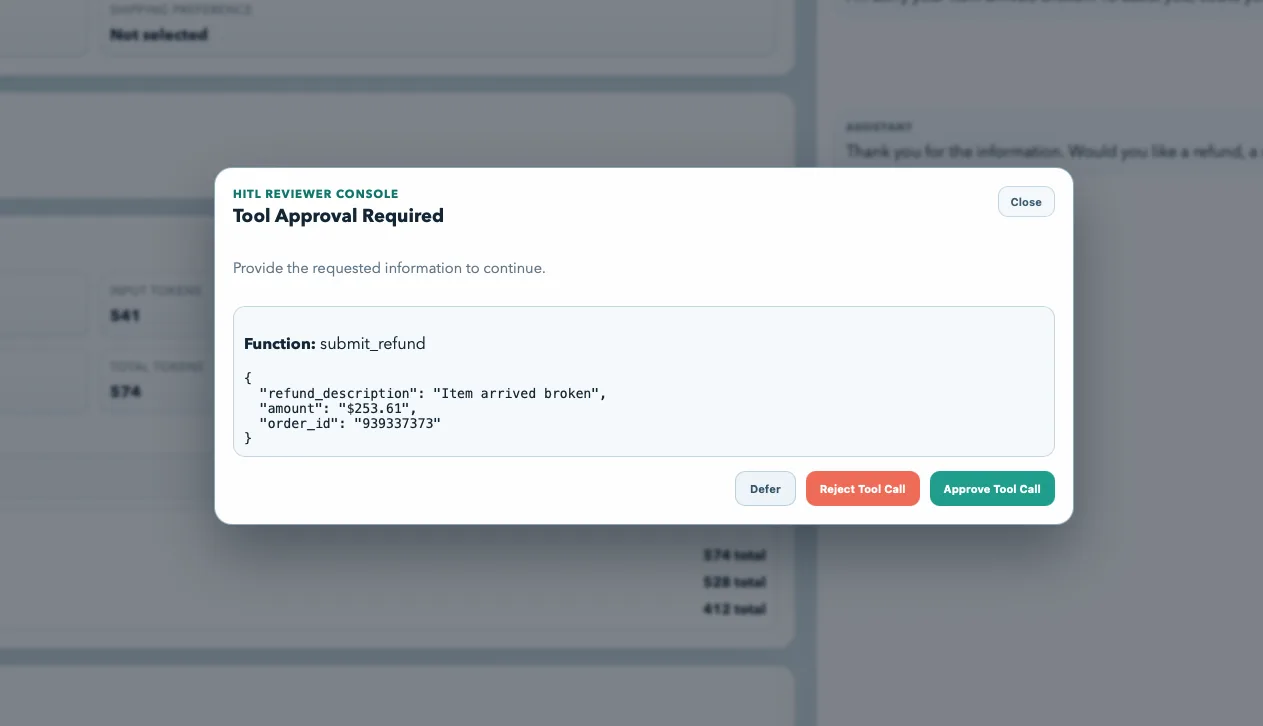
The frontend maintains a queue of pending interrupts so that multiple approval requests or information requests can be handled in sequence without losing state.
Running the Demo
The backend is a FastAPI server and the frontend is a Vite + React application. To run:
# Backend (from python/ directory)
uv sync
uv run python samples/05-end-to-end/ag_ui_workflow_handoff/backend/server.py

# Frontend (in a separate terminal)
cd samples/05-end-to-end/ag_ui_workflow_handoff/frontend
npm install
npm run dev
Open http://127.0.0.1:5173 in a browser and try a prompt like "I need a refund for order 987654." The triage agent routes to the refund specialist, which looks up order details, gathers a reason, and submits a refund request for your approval.
What This Demonstrates
This sample validates several capabilities working together in a single application:
- MAF workflows as AG-UI backends. Any workflow built with
HandoffBuilder(or other MAF orchestration patterns) can be exposed as an AG-UI endpoint with minimal glue code. - Dynamic, non-linear routing. Agents hand off based on conversation context, not a fixed sequence. The routing graph is declared in code and enforced by the framework.
- Human-in-the-loop at the tool level. Sensitive actions require explicit approval. The workflow pauses cleanly and resumes after the operator responds.
- Thread-scoped state. Each conversation gets its own workflow instance, so multiple users or sessions can run concurrently without interference.
- Real-time streaming UI. Every token, tool call, and state change is streamed to the frontend as it happens.
Learn More
- AG-UI Protocol specification
- Microsoft Agent Framework documentation
- Full sample code on GitHub
- Microsoft Agent Framework discussion board
Post Updated on April 8, 2026 at 08:07AM
Thanks for reading
from devamazonaws.blogspot.com
Comments
Post a Comment