[MS] Free Your Terminal with Detached Mode in Aspire 13.2 - devamazonaws.blogspot.com
Running Aspire apps from the CLI has a friction point: your terminal is locked to the AppHost process. While the app is running, you can't use the terminal to check logs or telemetry. You must open a new terminal window. Worse, if an agent has started your Aspire app to test a feature, the agent may decide to kill the app to free the terminal for a new command. Oops!
Aspire 13.2 fixes these problems with detached mode, a way to run an Aspire app in the background. Aspire 13.2 also introduces a new suite of process management commands that give you real CLI control over your application lifecycle.
Running in the Background
The simplest feature is often the most useful. With detached mode, you start your AppHost and immediately get your terminal back:
aspire start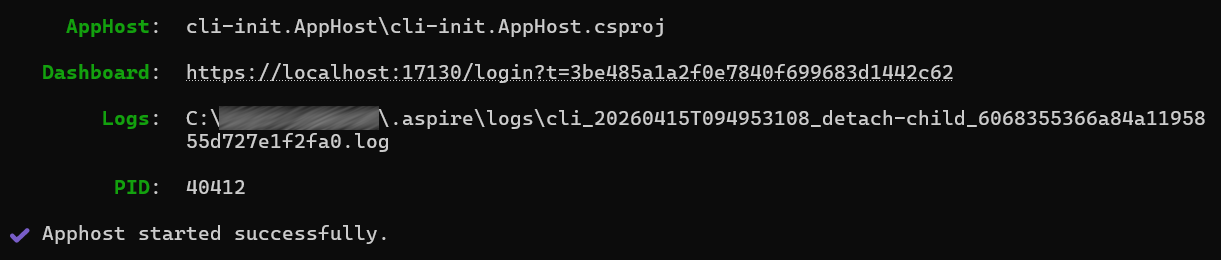
That's it. Your AppHost spins up in the background, and you're ready to run other commands in the same terminal. No more hunting for another shell window or tmux session.
This is especially valuable during local development when you're:
- Running your AppHost while you inspect its state, such as with
aspire describein the same terminal. - Working in a constrained environment (remote shell, CI/CD runner) where terminal windows are limited.
- Working with a coding agent to inject runtime behavior. The coding agent will start your app in the background, then make terminal commands to send HTTP requests, fetch logs with
aspire logs, and eventually shut down the app.
[alert type="important" heading="Note"] aspire start is a shortcut for aspire run --detach. They do the same thing. [/alert]
Managing Multiple AppHosts
Detached mode shines when you're juggling multiple projects. List all running Aspire AppHosts:
aspire ps
If you combine detached mode with isolated mode, then each AppHost is isolated, running on its own ports, with its own dashboard and telemetry.
When you're done with one, stop it cleanly:
aspire stopThis displays a prompt to choose which AppHost to stop. If you want to stop a specific AppHost without a prompt, use the --apphost option:
aspire stop --apphost my-app/apphost.csThe process shuts down gracefully, giving your services time to clean up connections and flush logs.
[alert type="important" heading="Note"] Your Aspire Dashboard is still fully available in detached mode. Click the dashboard link after aspire start finishes, or run aspire ps to find it. [/alert]
Running Your App From a Coding Agent
Detached mode is especially powerful when a coding agent is driving your development workflow. Because aspire start returns control to the terminal immediately, the agent can start the app, inspect its state, diagnose issues, and take action—all in a single session.
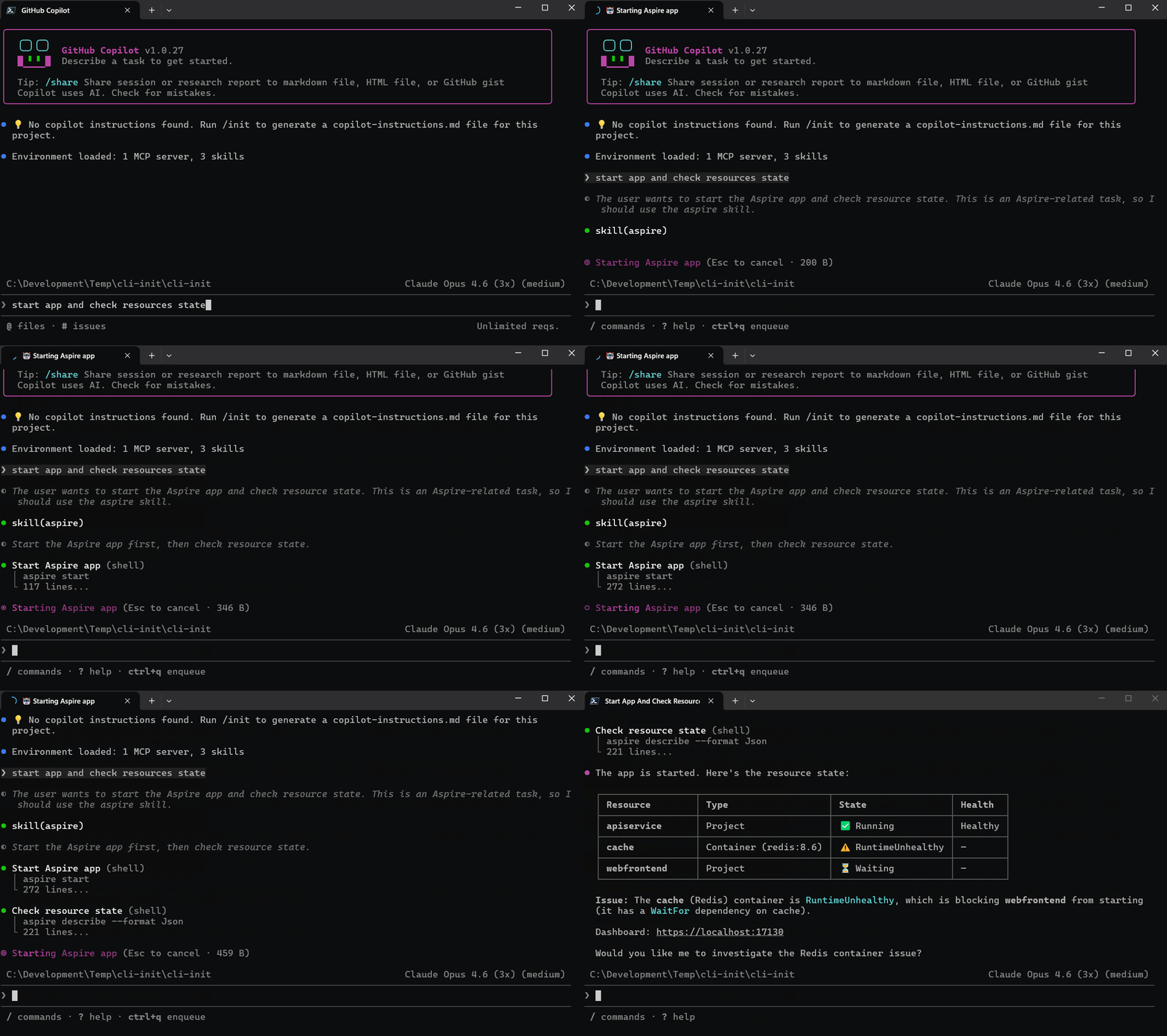
Below is a real example. A user asks their coding agent to start the app and check whether everything is healthy:
❯ start app and check resources stateThe agent runs aspire start to launch the AppHost in the background, then immediately runs aspire describe --format Json to inspect resource state. It reports back with a table:
┌─────────────────┬───────────────────────┬─────────────────────┬─────────┐
│ Resource        │ Type                  │ State               │ Health  │
├─────────────────┼───────────────────────┼─────────────────────┼─────────┤
│ apiservice      │ Project               │ ✅ Running          │ Healthy │
├─────────────────┼───────────────────────┼─────────────────────┼─────────┤
│ cache           │ Container (redis:8.6) │ ⚠️ RuntimeUnhealthy │ —       │
├─────────────────┼───────────────────────┼─────────────────────┼─────────┤
│ webfrontend     │ Project               │ ⏳ Waiting          │ —       │
└─────────────────┴───────────────────────┴─────────────────────┴─────────┘
The agent spots the problem: the Redis cache container is unhealthy, which is blocking the web frontend from starting. It then offers to investigate further—all without the user having to open a dashboard or switch terminals.
This is possible because the CLI gives the agent a way to start the app without blocking, query resource state, fetch logs, and eventually stop the app—all through simple terminal commands.
[alert type="important" heading="Note"] The aspire agent init command automatically sets up an Aspire skill for the agent to use to get the best results. [/alert]
When to Use Detached Mode
Use it when:
- Local development: You want to inspect resources with
aspire describe, check logs withaspire logs, or rundotnet testwhile your AppHost is running—all from the same terminal. - CI/CD pipelines: Your build runner has a single terminal. Start the AppHost, run integration tests, then stop it—no extra shell needed.
- Coding agents: An agent needs to start your app, query its state, make HTTP requests, and shut it down—all as sequential terminal commands.
- Constrained environments: You're working over SSH or in a remote container where opening additional terminal windows isn't practical.
Get Involved
- 📖 Learn more: Read the full documentation on Aspire CLI at aspire.dev.
- 💬 Give us feedback: We'd love to hear what you think — file issues or join discussions on the Aspire GitHub repo.
- 🌐 Join the community: Follow us and connect with other Aspire developers at aspire.dev/community.
Post Updated on April 16, 2026 at 06:00PM
Thanks for reading
from devamazonaws.blogspot.com
Comments
Post a Comment