[MS] Coordinating AI-Assisted Development with AGENTS.md and Skills - devamazonaws.blogspot.com
Introduction
When multiple engineers on a team use AI coding tools independently — without shared context about the project's architecture or conventions — the output quality is inconsistent. One developer gets a well-structured endpoint; another gets generic boilerplate that needs to be rewritten. The AI is capable, but it is working blind. This post describes a pattern the ISE team applied on a customer engagement to solve this problem: AGENTS.md files for project-level context and reusable skills for task-level instructions, both consumed automatically by GitHub Copilot CLI. The pattern is both language and framework agnostic. The examples here are drawn from an Azure-deployed polyglot stack (Python/FastAPI backend, Next.js/React frontend, Terraform infrastructure), but the approach applies to any codebase.The Problem: Ad-Hoc AI Usage Doesn't Scale
On an ISE engagement involving two Azure-deployed SaaS products, each living in its own polyglot monorepo (infrastructure, backend, and frontend), the team observed that engineers were using GitHub Copilot CLI individually with no shared context about the project. The consequences were predictable:- Scaffolded code landed in wrong directories
- Generated tests did not follow the team's AAA (Arrange-Act-Assert) pattern
- Import paths, naming conventions, and dependency injection patterns varied between engineers
- Significant time was spent reworking AI-generated output to match project standards
The Solution: AGENTS.md + Skills
The team addressed this with two complementary patterns for guiding AI-assisted development:
AGENTS.md: Project-Level Context
AGENTS.md is an emerging convention for repository-level AI guidance. GitHub Copilot can use repository instructions such as AGENTS.md to improve context, and teams can adopt the file as a consistent place to document architecture and conventions. It is a single markdown file placed at the root of a repository that serves as the AI's onboarding guide — the equivalent of walking a new team member through the codebase. A well-structured AGENTS.md contains:- Project overview: What the product does, who it is for, deployment target
- Architecture: The full folder structure with annotations
- Tech stack: Languages, frameworks, versions
- Coding conventions: Naming patterns, import ordering, error handling, test patterns
# Project AI Agent Guidelines

> Instructions for GitHub Copilot and AI coding assistants.

## Project Overview

An environmental risk assessment platform. The stack consists of a
Next.js frontend, Python FastAPI backend, and Terraform infrastructure
deployed to Azure.

## Architecture

project-root/
├── Frontend/           # Next.js 15 + React 19 + TypeScript (Turborepo)
│   ├── apps/
│   │   ├── main-app/       # Main application
│   │   └── storybook/      # Design system
│   └── packages/
│       └── ui/             # Shared UI components (Atomic Design)
├── Backend/            # Python 3.13 + FastAPI
│   └── src/
│       ├── main.py
│       ├── models/         # Domain models (dataclasses)
│       ├── schemas/        # Pydantic schemas (request/response DTOs)
│       ├── routers/        # API route handlers
│       ├── services/       # Business logic (SRP)
│       ├── repositories/   # Data access layer (DIP)
│       └── infrastructure/ # DI container, DB connections
└── Infrastructure/     # Terraform + Go (Terratest)

## Coding Conventions

- Testing: Follow AAA pattern (Arrange-Act-Assert) with explicit section comments
- Architecture: SOLID principles — services depend on repository interfaces
- Imports: Use absolute imports from project root
- Error handling: Custom exception classes per domainWhy does this matter?
Without AGENTS.md, every Copilot CLI invocation is context-free. The AI does not know that the backend uses FastAPI with dependency injection, that tests follow AAA, or that repositories implement interface segregation. With AGENTS.md, the AI understands all of this before generating a single line of code.Skills: Task-Level Instructions
Skills are a reusable pattern for guiding AI agents through repeatable tasks — step-by-step instruction files that guide an agent through a specific task. Each skill should follow a dedicated directory under.github/skills/ containing the instruction file and any supporting assets, telling the AI exactly how to scaffold a particular type of work.
On this engagement, the team built four skills:
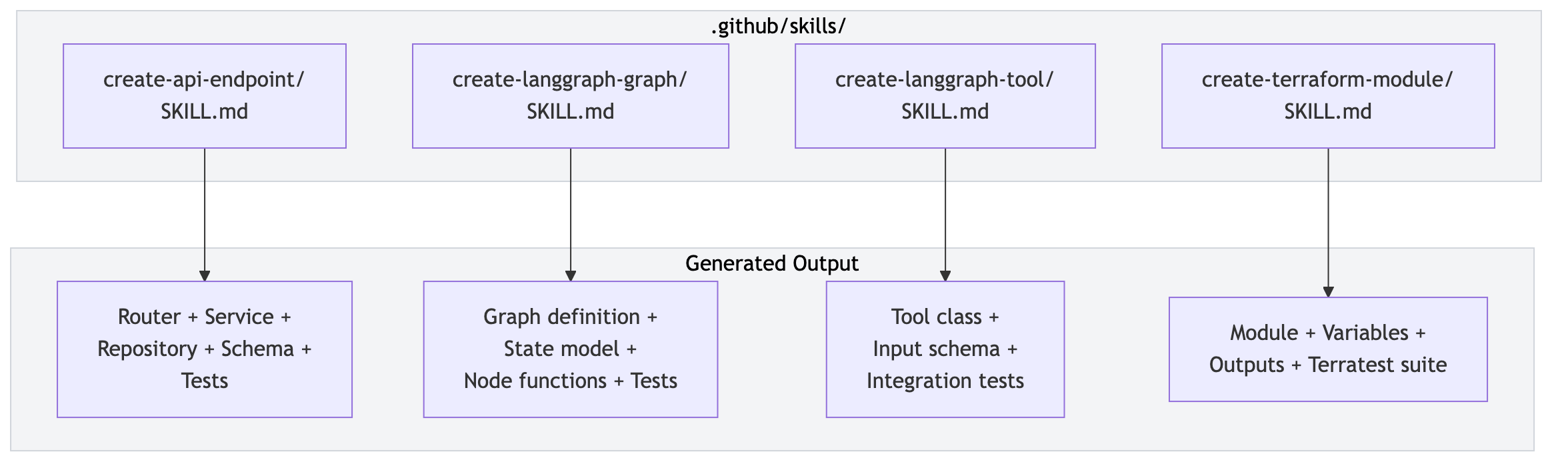 Each skill file contains:
- When to use this skill: A description of the task it covers
- Prerequisites: What must exist before running (e.g., a domain model)
- Step-by-step instructions: Exact sequence of files to create, directories, and patterns to follow
- Template code: Skeleton code with placeholders matching the project's conventions
- Test generation: Instructions for creating corresponding test files alongside production code
# Create API Endpoint

## When to Use
Use this skill when creating a new REST endpoint in the backend.

## Steps

1. Create the Pydantic schema in src/schemas/{entity}.py
   - Request and response models
   - Follow existing naming: {Entity}Response, {Entity}Request

2. Create the repository interface in src/repositories/interfaces/
   - Extend IRepository[T]
   - Define abstract methods for the needed data operations

3. Create the SQL implementation in src/repositories/implementations/
   - Implement the interface with parameterized queries

4. Create the service in src/services/{entity}_service.py
   - Constructor accepts repository interfaces (DIP)

5. Create the router in src/routers/{entity}_v2.py
   - Use FastAPI Depends() for dependency injection

6. Register the router in src/main.py

7. Create unit tests in src/tests/unit/
   - Mirror the source structure, follow AAA pattern, mock repositories

8. Create integration tests in src/tests/integration/
- Test against real database via TestcontainersHow They Work Together
The two pieces are complementary: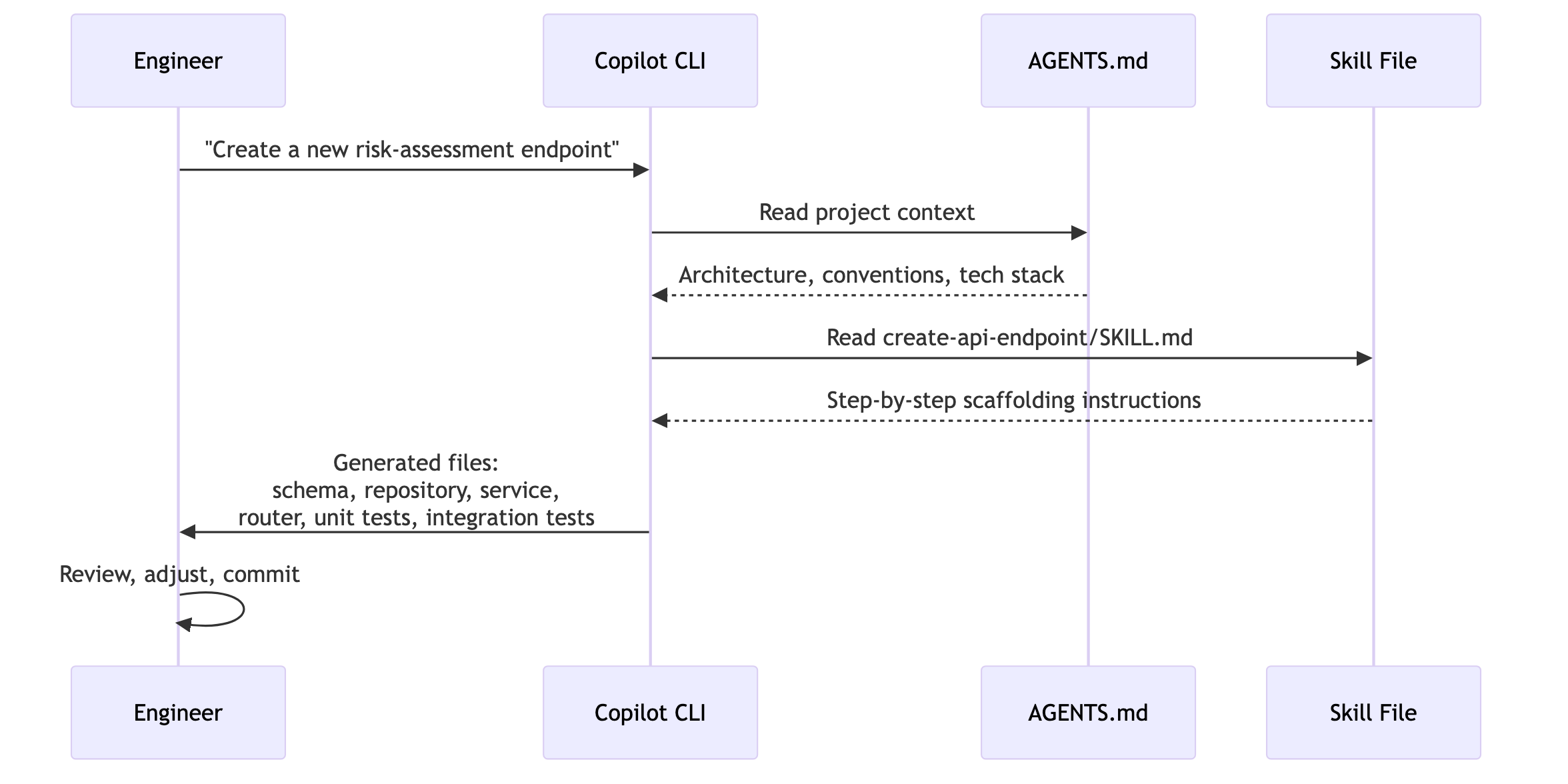
- AGENTS.md provides the "what" and "why" — what the project is, what tech stack it uses, what conventions the team follows
- Skills provide the "how" — the exact steps and file structure for a specific task
# From the repository root, an engineer invokes Copilot CLI:
gh copilot suggest "Create a new API endpoint for environmental reports"

# Copilot CLI reads AGENTS.md (project context) and matches the
# create-api-endpoint skill. It then generates files following the
# skill's step-by-step instructions:
#   - src/schemas/report.py        (Pydantic request/response models)
#   - src/repositories/interfaces/report_repository.py
#   - src/repositories/implementations/report_repository.py
#   - src/services/report_service.py
#   - src/routers/report_v2.py
#   - src/tests/unit/test_report_service.py
# - src/tests/integration/test_report_router.pyThe Verification Layer
Speed without safety is a liability. The team ensured that every AI-assisted change flowed through a verification layer before merging: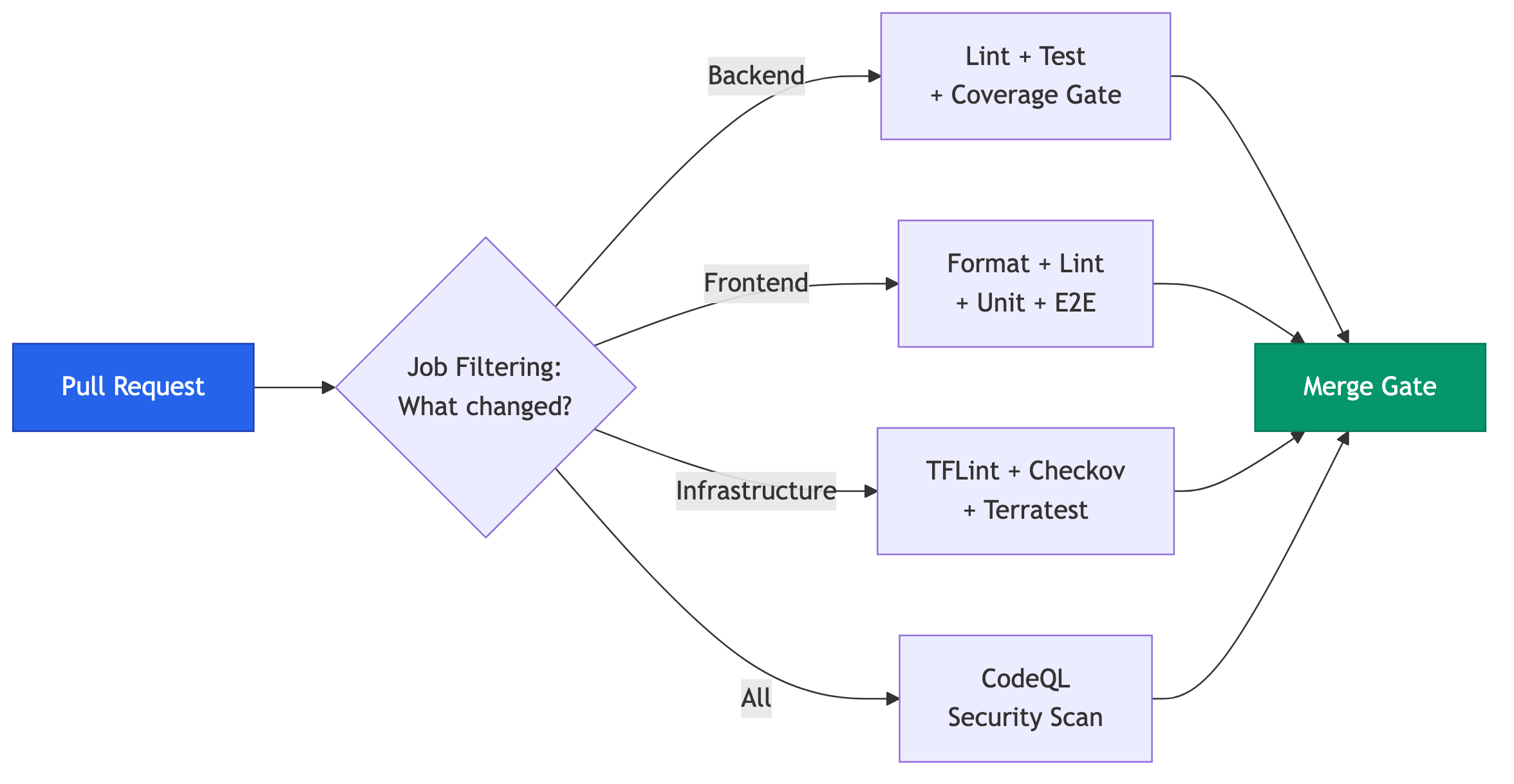 This included targeted CI with job filtering, so a frontend change did not trigger infrastructure tests. The team also built a full testing pyramid (unit, integration with Testcontainers, and E2E with Playwright), enforced CodeQL to help reduce security findings to zero, and added automated linting with tools such as Ruff, Prettier, and Checkov.
The operating model became: "Accelerate with AI, then verify through engineering rigor."
This included targeted CI with job filtering, so a frontend change did not trigger infrastructure tests. The team also built a full testing pyramid (unit, integration with Testcontainers, and E2E with Playwright), enforced CodeQL to help reduce security findings to zero, and added automated linting with tools such as Ruff, Prettier, and Checkov.
The operating model became: "Accelerate with AI, then verify through engineering rigor."
Applying This Pattern
For teams looking to adopt this approach:- Start with AGENTS.md. Even without skills, adding an AGENTS.md to a repository can improve Copilot CLI output quality right away. Be specific about file locations, include version numbers, and document test patterns explicitly.
- Identify the first skill. Look for the task the team repeats most often that follows consistent steps. Build a skill for it and iterate based on output quality.
- Wire guardrails into CI. The confidence to lean into AI-assisted development comes from knowing that tests, linting, and reviews will catch mistakes. Invest in this before scaling AI usage.
- Maintain and evolve. Skills need to evolve as the codebase evolves. When patterns change — a new testing approach, a dependency update, a refactored folder structure — update the corresponding files. Treat them as living documentation, not write-once artifacts.
Designing New Skills
Once you have an AGENTS.md in place, adding new skills is straightforward. For each new capability, add a small, focused Markdown file under.github/skills/ that describes how to perform one repeatable task in your codebase.
A Simple Recipe for New Skills
When creating a new skill, you can follow a simple pattern:- Pick a narrow, repeatable task. Choose something that already has a “usual way” on your team, such as adding a new endpoint, wiring observability, or creating a background job.
- Describe when to use it. Start with a short paragraph such as “Use this skill when you need to add a new scheduled job to run on a timer in the backend.”
- List prerequisites. Call out what must exist first: a domain model, a config entry, a feature flag, or a specific service.
- Spell out the steps. Write an ordered list of concrete actions that match your conventions. Name exact directories, filenames, and patterns (for example, creating a new router and registering it in
src/main.py). - Include testing expectations. End with instructions for the tests that should be created or updated alongside the change and where those tests live.
- Try it with Copilot CLI and refine. Run the skill on a throwaway branch, see what Copilot generates, and adjust the wording, file paths, or examples until the output reliably matches what a senior engineer would produce.
Examples of Reusable Team and ISE Skills
Beyond project-specific skills like creating API endpoints or Terraform modules, our teams can benefit from reusable skills that encode team and ISE patterns they repeat on every project, regardless of the repository. Some examples include:- Add structured logging and metrics. Standardize how to add log statements, correlation identifiers, and metrics to an existing endpoint or service.
- Introduce a feature flag for an existing behavior. Define how to wrap a piece of logic behind a flag, including config changes, rollout strategy, and tests.
- Harden error handling in a module. Describe how to replace ad hoc exceptions with project-standard error types and consistent HTTP responses or error codes.
- Add tests around an existing route or service. Guide Copilot through creating or improving unit and integration tests for code that already exists, following your test directory structure and patterns.
- Create a background job or scheduled task skeleton. Encode where jobs live, how they are scheduled, how they log, and how to test them.
- Create pull requests using a standard description template. Guide Copilot to open PRs with a consistent title, description sections, and checklist aligned with your team's review process.
Skill Lifecycle and Governance
As your catalog of skills grows, managing them with intention becomes just as important as creating the first few.Naming, Structure, and Discoverability
- Use clear, action-oriented names. Prefer names like
create-api-endpointoradd-feature-flagover generic labels. This makes it obvious when a skill should be used. - Organize skills by domain or layer. Each skill lives in its own directory under
.github/skills/, containing the instruction file and any supporting assets. Use clear, prefixed directory names (for example,backend-api-endpoints/,frontend-testing/,infrastructure-terraform-modules/) so engineers and AI tools can quickly find the right skill. - Document usage in AGENTS.md. Add a short catalog section in AGENTS.md that lists available skills and when to use each one.
Ownership and Review
- Assign owners. Treat skills like production code. Give each one a clear owner responsible for keeping it aligned with current practices. It's best to make sure you have owners on both the ISE and customer teams for smooth handoff.
- Review changes through normal PRs. Any update to AGENTS.md or a skill file should go through the same pull request process as application code, including code review from the owning team.
- Version alongside the codebase. Avoid external wikis for skill definitions; keep them in the repository so changes travel with the code they describe.
Evolving Skills Safely
- Update skills when patterns change. When you introduce a new testing strategy, logging library, or directory structure, update the relevant skills as part of the same change.
- Deprecate rather than delete. If a skill becomes obsolete, mark it as deprecated, explain what replaced it, and then remove it once usage has tapered off.
- Measure impact. Periodically sample AI-generated output from skills to confirm it still matches what a senior engineer would write. Use that feedback to refine wording and examples.
Anti-Patterns When Creating Skills
As useful as skills are, certain patterns tend to reduce their effectiveness:- Overly broad scope. A single skill that tries to “build a new microservice” or “set up the entire frontend” is hard for an AI agent to execute reliably. Keep each skill narrowly focused on one task.
- Brittle assumptions. Hard-coding file paths, magic names, or environment-specific details makes skills fragile. Prefer patterns and conventions over exact, environment-specific values.
- Missing tests. Skills that do not mention tests often lead to untested changes. Always include explicit instructions for unit, integration, and end-to-end tests.
- Mixed concerns. Combining infrastructure, backend, and frontend steps into one skill makes it harder to maintain and reuse. Separate skills by concern so they can evolve independently.
- Out-of-sync documentation. Storing the “real” instructions in a wiki and only a partial version in the repository leads to drift. Keep the source of truth with the code.
Lessons Learned
What worked well
- AGENTS.md eliminated "blank slate" interactions — every Copilot CLI invocation started with full project context, producing output that matched conventions from the first generation
- Skills codified institutional knowledge into reusable, version-controlled artifacts available to every team member and every AI invocation
- Team-wide consistency improved immediately because context and patterns live in the repository, not in individual engineers' heads
- Onboarding accelerated — new engineers could use Copilot CLI with AGENTS.md and skills to ramp up on unfamiliar parts of the stack faster than traditional documentation alone
Challenges and limitations
- AGENTS.md quality directly impacts output quality — getting the right level of detail required iteration; too vague and the output becomes generic or inconsistent, too verbose and it exceeds context windows
- Skill maintenance is ongoing — when patterns change, stale skills produce stale output
- Context window limits meant that for larger files or complex cross-module changes, Copilot CLI sometimes produced output that was locally correct but did not account for dependencies elsewhere
- Trust calibration took time — some engineers initially over-trusted AI output while others under-trusted it; establishing shared validation norms backed by CI was essential
Summary
This post described a pattern for moving AI-assisted development from ad-hoc individual experimentation to a coordinated, team-wide capability:- AGENTS.md gives AI tools a shared understanding of architecture, tech stack, and conventions at the repository level
- Skills guide AI agents through specific repeatable tasks with step-by-step instructions that match project patterns
- CI enforcement (tests, linting, static analysis, PR reviews) creates the safety net that makes it viable to accelerate with AI while maintaining quality
Resources
- AGENTS.md — A Simple, Open Format for Guiding Coding Agents
- GitHub Copilot CLI Documentation
- Creating agent skills for GitHub Copilot CLI
- Adding Repository Custom Instructions for GitHub Copilot
- Testcontainers
- Ruff — Python Linter and Formatter
- Playwright — E2E Testing
- Checkov — Infrastructure as Code Static Analysis
- CodeQL — Code Security Analysis
- FastAPI Documentation
Attribution
The background of the featured image was generated using Microsoft Copilot image generation (powered by OpenAI's DALL-E model).Post Updated on May 21, 2026 at 08:00AM
Thanks for reading
from devamazonaws.blogspot.com

Comments
Post a Comment