[MS] Powering Memory in Foundry Agent Service, with Azure Cosmos DB - devamazonaws.blogspot.com
Move from a locally composed memory-enabled agent to a deployed Foundry Agent Service agent, with keyless Azure infrastructure and an interactive browser sample.
In Native Agent Memory for Microsoft Agent Framework, Powered by Azure Cosmos DB, we introduced CosmosMemoryContextProvider: a Microsoft Agent Framework context provider that extracts useful information from conversations, stores it in Azure Cosmos DB, and retrieves it before later agent runs.
That article used a locally composed Agent Framework agent and FoundryChatClient. It was a useful way to isolate the memory concepts: one provider, two lifecycle hooks, and a stable user identity across new chat sessions.
This post takes the next step. In our featured sample, we will attach the same provider to a prompt agent deployed in Microsoft Foundry Agent Service, provision the complete environment with azd up, and use a small browser app to make the difference between conversation history and long-term memory visible.
What the sample demonstrates
A normal chat session gives an agent short-term context. When that session ends, its message history no longer follows the user automatically.
Long-term memory has a different scope. In this sample:
- A Foundry Agent Service session represents one conversation.
- A stable user ID scopes long-term memory in Azure Cosmos DB.
- Starting a new conversation replaces the session but keeps the user ID.
- Switching users replaces both, demonstrating memory isolation.
The sample lets you test all four behaviors directly. Tell the agent a preference, select New conversation, and ask about that preference again. Then switch to another demo user and verify that the second user does not inherit it.
This distinction matters in production systems. A thread ID answers “which conversation is this?” A user or tenant identity answers “whose durable memory is this?” Treating those as the same identifier makes it difficult to support multiple conversations safely.
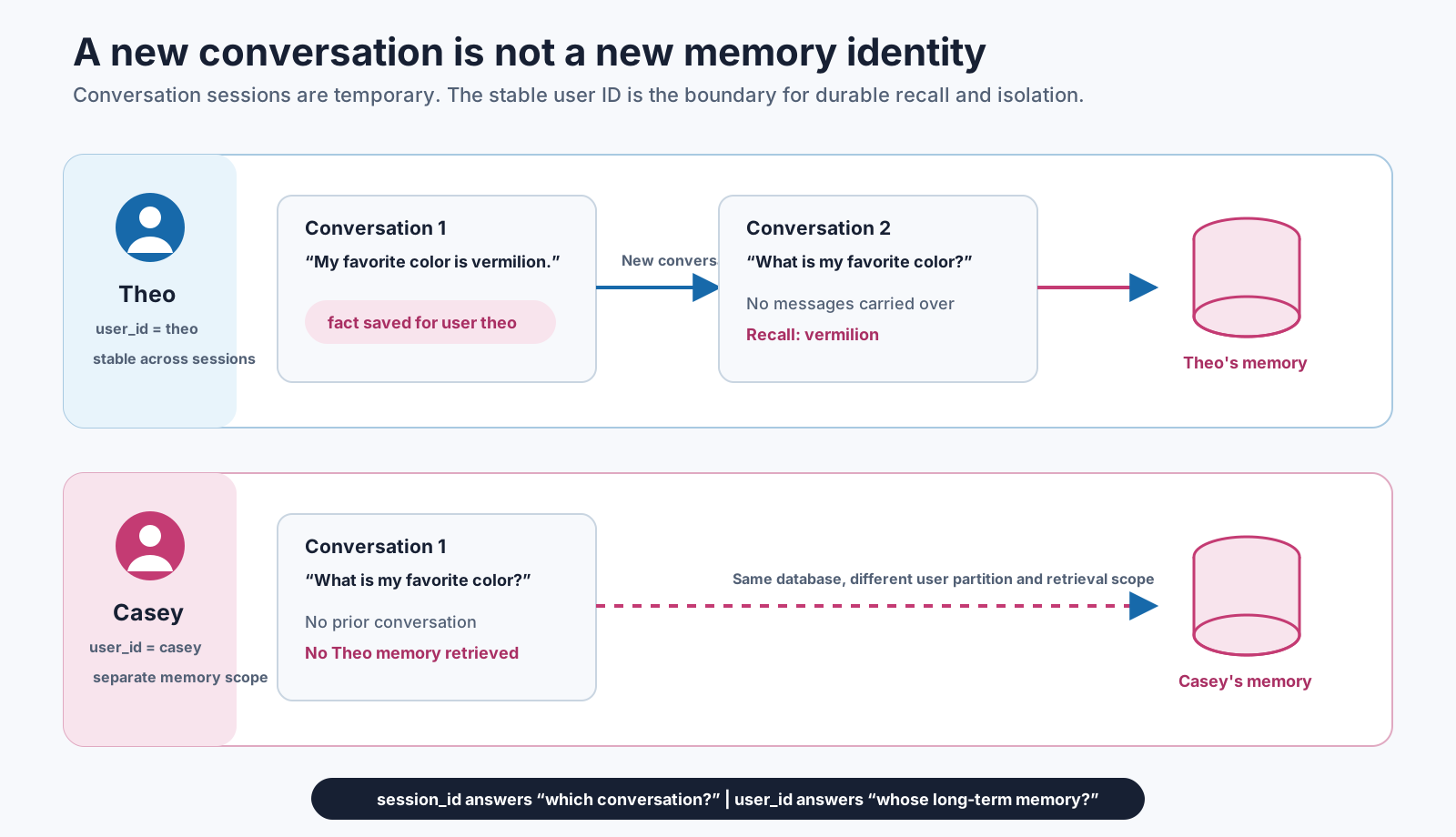
Figure 1. Conversation sessions are temporary, while a stable user ID scopes durable memory and keeps different users isolated.
Architecture
The deployment contains:
- A Microsoft Foundry account and project.
- A prompt agent in Foundry Agent Service.
gpt-5-minifor chat andtext-embedding-3-largefor memory embeddings.- An Azure Cosmos DB for NoSQL account and database with vector and full-text search capabilities.
- Microsoft Entra ID role assignments for keyless access.
- A local Chainlit app for the interactive experience.
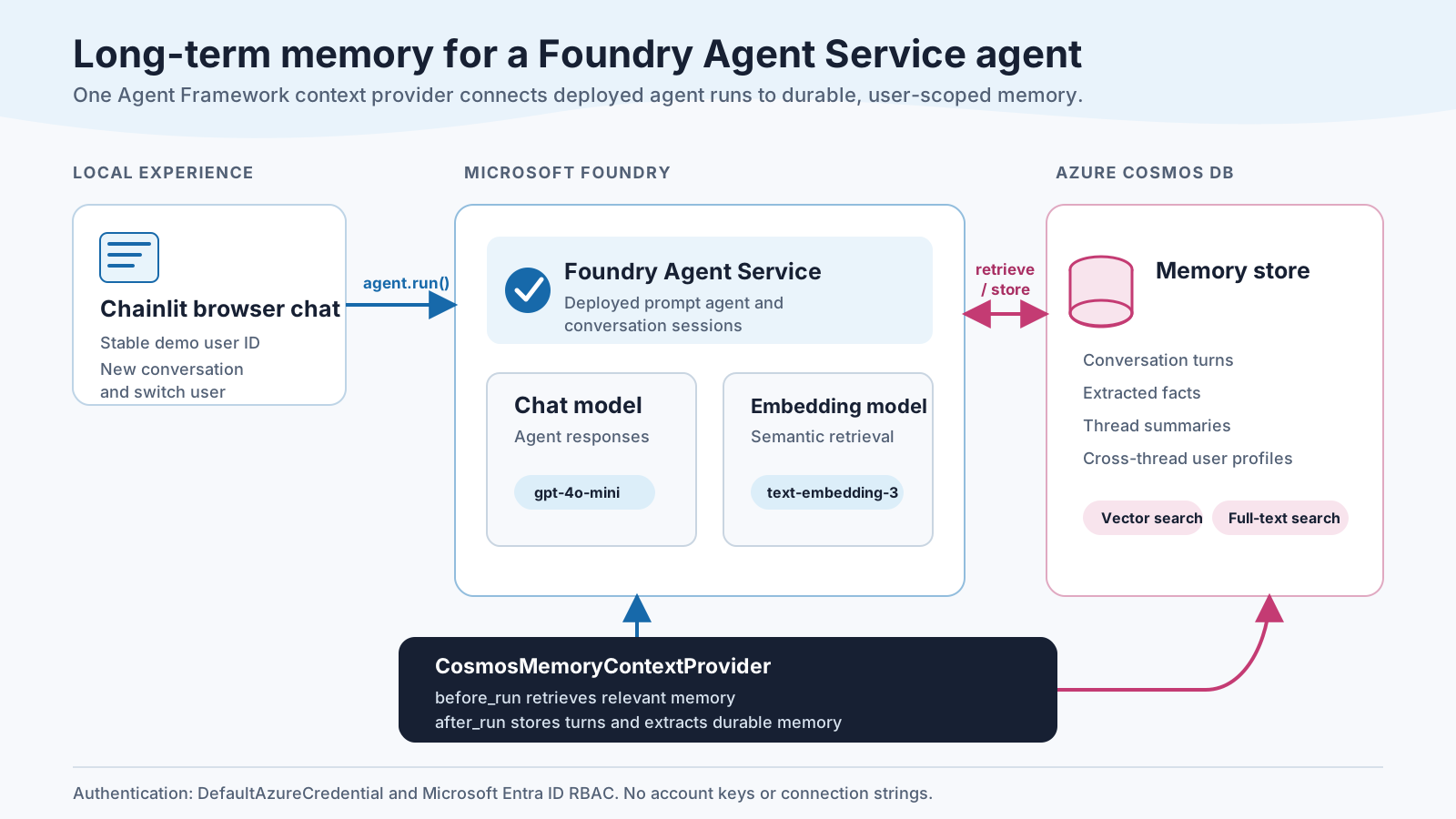
Figure 2. The context provider participates in each agent run, retrieving relevant memory before the run and storing turns and derived memory afterward.
The browser app is intentionally local. The goal is to keep the sample focused on the agent and memory integration, without adding a second hosted application or an authentication system. For a production application, derive the memory user ID from an authenticated identity rather than accepting a typed value.
The integration is still one context provider
The shared runtime creates one credential, the Cosmos memory provider, and a FoundryAgent bound to the deployed prompt agent:
credential = DefaultAzureCredential()

memory = CosmosMemoryContextProvider(
    cosmos_endpoint=config.COSMOS_ENDPOINT,
    cosmos_database=config.COSMOS_DATABASE,
    foundry_endpoint=config.FOUNDRY_PROJECT_ENDPOINT,
    embedding_model=config.EMBEDDING_MODEL,
    chat_model=config.CHAT_MODEL,
    credential=credential,
    memory_types=["fact", "procedural", "episodic"],
)

agent = FoundryAgent(
    project_endpoint=config.FOUNDRY_PROJECT_ENDPOINT,
    agent_name=config.FOUNDRY_AGENT_NAME,
    agent_version=os.getenv("FOUNDRY_AGENT_VERSION"),
    credential=credential,
    context_providers=[memory],
)
The important line remains:
context_providers=[memory]
Microsoft Agent Framework invokes the provider around each run:
before_runsearches for relevant memory and adds it to the agent context.after_runrecords the turn and starts memory extraction and consolidation.
The application does not need to add a memory tool to the prompt agent or ask the model to call Cosmos DB. Memory participates through the Agent Framework lifecycle.
Conversation identity versus memory identity
When the app creates a conversation, it creates a new Agent Framework session and adds the durable user identity to the provider state:
def create_session(self, user_id: str):
    session = self.agent.create_session()
    session.state.setdefault(self.memory.source_id, {})["user_id"] = user_id
    return session
Selecting New conversation calls this method again with the same user_id. The new session has no previous chat transcript, but the provider can retrieve memories stored for that user.
Switching users creates another session with another user_id. Because memory documents are partitioned and queried by that identity, one demo user does not receive another demo user's memories.
This is the central design decision in the sample. The UI exists to make it observable rather than hiding it inside a test script.
Try the interactive sample
You need the Azure Developer CLI, Azure CLI, Python 3.11 or later, and an Azure subscription where you can create resources and assign roles.
Clone the repository and deploy:
git clone https://github.com/AzureCosmosDB/foundry-cosmos-memory
cd foundry-cosmos-memory

az login
azd up
The Bicep deployment creates Foundry, the model deployments, Cosmos DB, and the required role assignments. A post-provision hook then creates a new version of the prompt agent and runs a deterministic cross-conversation memory test..
After deployment, export the environment and start the chat.
PowerShell:
azd env get-values | Set-Content .env
.\.venv\Scripts\python.exe -m pip install -r requirements-ui.txt --pre
.\.venv\Scripts\python.exe -m chainlit run src/chat.py
Bash:
azd env get-values > .env
. .venv/bin/activate
python -m pip install -r requirements-ui.txt --pre
python -m chainlit run src/chat.py
Open http://localhost:8000 and pick a demo user from the selector (for example, theo), or choose Type my own.
Try this sequence:
- Send:
Remember that my favorite color is vermilion. - Wait for the Save long-term memory step to complete.
- Start a New chat (top-left) and choose
theoagain. - Ask:
What is my favorite color? -
Start a New chat (top-left), choose
casey, then ask the same question to demonstrate isolation.
The first recall happens in a new Foundry Agent Service conversation. The second identity should not receive Theo's preference.
What Azure Cosmos DB contributes
Agent memory needs more than transcript storage. A useful memory system must identify durable information, represent it for retrieval, and return only memories relevant to the current request.
The provider uses Azure Cosmos DB as the operational store for turns and derived memory. It can combine:
- Vector similarity for semantic relevance.
- Full-text relevance for lexical matches.
- Structured metadata such as user and memory type.
- A single database for the original turns, extracted facts, summaries, and retrieval indexes.
The sample enables vector and full-text search capabilities on the Cosmos DB account. It does not deploy a separate vector database or synchronize a second search service.
Because Cosmos DB is the system of record, you can inspect the generated data in Data Explorer. After running the sample, look for turn documents and extracted memory associated with the demo user ID.
A deterministic deployment check
Conversational demos are useful, but deployment automation needs a clear pass or fail. The post-provision hook runs a separate smoke test that:
- Generates a fresh user ID.
- Teaches a peanut allergy in one session.
- Flushes memory extraction.
- Creates a second session for the same user.
- Asks for trail-lunch advice and checks that the reply mentions peanuts.
A fresh identity on every run prevents old memory from creating a false positive. If recall is inconclusive, the script exits nonzero and azd up fails instead of reporting a successful deployment.
You can rerun that check at any time:
.\.venv\Scripts\python.exe -m src.run_memory_test
The browser app and smoke test use the same shared runtime, so the automated check exercises the same agent and provider construction as the interactive experience.
Production considerations
The sample keeps identity deliberately simple to make the memory boundary easy to see. Before using the pattern in an application, consider:
- Map
user_idto a trusted authenticated principal, and include tenant scope where needed. - Define retention, deletion, export, and consent flows for durable memory.
- Avoid storing secrets or sensitive personal information unless your design and compliance requirements explicitly support it.
- Tune extraction prompts, memory types, confidence thresholds, and extraction cadence for your domain.
- Evaluate false recall, missing recall, contradictory facts, and cross-user isolation with representative conversations.
- Add observability around extraction latency, retrieval results, token use, Cosmos DB request units, and failures.
- Review model availability and quota in the target Azure region before deployment.
Memory is application data. It deserves the same identity, privacy, lifecycle, and evaluation discipline as any other durable user data.
Get started
The earlier post explained why a context provider is a natural Agent Framework abstraction for memory. This sample carries that abstraction into a deployed Foundry Agent Service agent without changing the core integration.
Run azd up, open the browser chat, and test the boundary yourself: new conversation, same user; then new user, isolated memory.
- Download the sample
- Read the previous Agent Framework memory post
- Learn about Microsoft Agent Framework
- Learn about vector search in Azure Cosmos DB for NoSQL
- Learn about full-text search in Azure Cosmos DB for NoSQL
To remove the sample resources when you are finished:
azd down --purge
About Azure Cosmos DB
Azure Cosmos DB is a fully managed and serverless NoSQL and vector database for modern app development, including AI applications. With its SLA-backed speed and availability as well as instant dynamic scalability, it is ideal for real-time NoSQL and MongoDB applications that require high performance and distributed computing over massive volumes of NoSQL and vector data.
To stay in the loop on Azure Cosmos DB updates, follow us on X, YouTube, and LinkedIn.
Post Updated on August 24, 2026 at 05:04PM
Thanks for reading
from devamazonaws.blogspot.com

Comments
Post a Comment