[MS] Browser automation tool in Microsoft Foundry is now GA - devamazonaws.blogspot.com
AI agents can reason over data, invoke APIs, and coordinate complex workflows. Yet many business processes still depend on websites, including internal portals, administrative consoles, vendor systems, dashboards, and applications without complete API coverage.
Browser automation tool in Microsoft Foundry is now generally available. Browser automation tool gives agents a managed browser so they can navigate websites, inspect content, complete forms, and perform multistep browser workflows using natural-language instructions.
Powered by Playwright Workspaces, Browser Automation Tool brings scalable browser infrastructure, enterprise connectivity, observability, and human oversight directly into Microsoft Foundry.
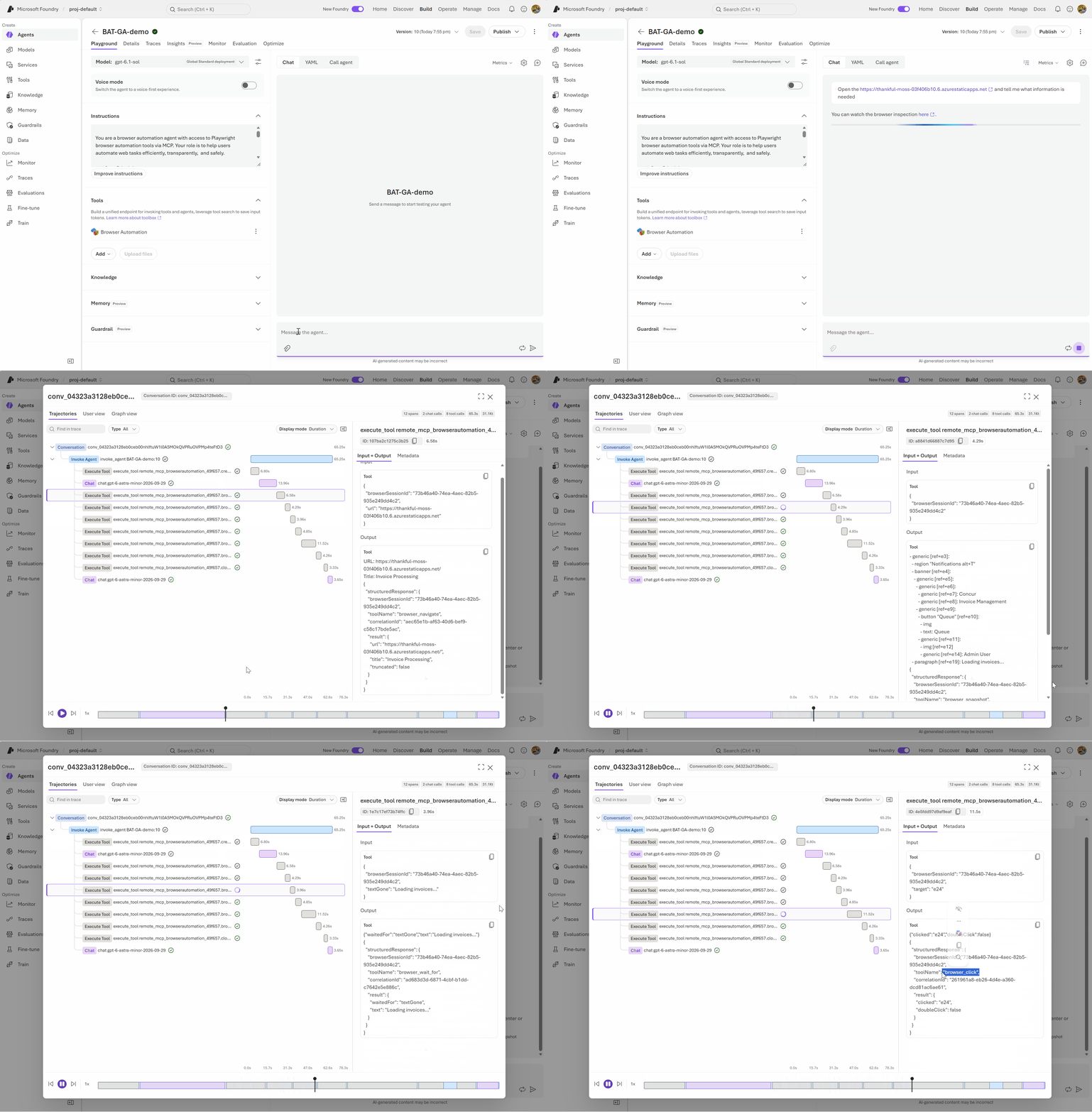 Organizations can:
Post Updated on October 19, 2026 at 11:32AM
Thanks for reading
from devamazonaws.blogspot.com
Browser automation for every Foundry agent
Browser Automation Tool works across the ways developers build agents in Microsoft Foundry:- Prompt agents provide the fastest way to create a browser-enabled agent by configuring its instructions, model, and tools.
- Hosted agents let developers combine browser automation with custom orchestration built using Microsoft Agent Framework or another framework.
- Github copilot harness support enables builders to have a managed way to build a complex, long-running agent.
Connect agents to public and private websites
Enterprise workflows rarely exist entirely on the public internet. Important tasks often involve internal applications, private administrative portals, or services available only through a virtual network. Browser automation tool enables agents to interact with both public websites and private applications protected behind an Azure virtual network. With Playwright Workspaces private network connectivity, an agent can move across public and internal systems as part of the same workflow while maintaining the organization's network boundaries. Private network connection should be added while provisioning the Playwright Workspace. This unlocks scenarios such as:- Processing information across internal and external business portals
- Automating employee onboarding and IT administration workflows
- Retrieving data from vendor sites and entering it into private applications
- Investigating customer issues across public experiences and internal support tools
- Automating legacy systems that don't provide modern APIs
Native remote MCP integration through toolboxes
Browser automation tool is natively integrated with Toolboxes in Microsoft Foundry experience. Toolbox provides a reusable way to curate, govern, and share tools across agents. Developers can add browser automation tool to a toolbox, publish it, and connect it to Prompt agents or Hosted agents through its MCP-compatible endpoint.import asyncio
from agent_framework import Agent
from agent_framework.foundry import FoundryChatClient, FoundryToolbox
from azure.ai.projects import AIProjectClient
from azure.ai.projects.models import (
BrowserAutomationToolboxTool,
BrowserAutomationToolParameters,
BrowserAutomationToolConnectionParameters,
)
from azure.identity import AzureCliCredential
PROJECT_ENDPOINT = "https://.services.ai.azure.com/api/projects/"
BROWSER_CONNECTION_ID = "your-browser-automation-connection-id"
async def main() -> None:
credential = AzureCliCredential()
# 1. Add the Browser automation tool to a toolbox. Using a toolbox is the recommended way
# to give agents tools: you curate tools once and reuse the toolbox across agents.
# See /azure/foundry/agents/concepts/toolbox-overview
project = AIProjectClient(endpoint=PROJECT_ENDPOINT, credential=credential)
tool = BrowserAutomationToolboxTool(
browser_automation=BrowserAutomationToolParameters(
connection=BrowserAutomationToolConnectionParameters(
project_connection_id=BROWSER_CONNECTION_ID,
)
)
)
toolbox = project.toolboxes.create_version(
name="browser-automation-toolbox",
description="Toolbox with the Browser Automation tool",
tools=[tool],
)
# 2. The toolbox exposes an MCP-compatible endpoint.
TOOLBOX_MCP_URL = (
f"{PROJECT_ENDPOINT}/toolboxes/{toolbox.name}"
f"/versions/{toolbox.version}/mcp?api-version=v1"
)
# 3. Attach the toolbox to the hosted agent as an MCP tool.
, timeout=120.0)
toolbox_tool = FoundryToolbox(credential, url=TOOLBOX_MCP_URL)
agent = Agent(
client=FoundryChatClient(credential=credential),
instructions=(
"You help with browser automation tasks. Use the Browser Automation tool "
"to navigate and read information from websites."
),
tools=[toolbox_tool],
)
result = await agent.run(
"Go to finance.yahoo.com, search for MSFT, click 'YTD' on the price chart, "
"and report the year-to-date percent change."
)
print(f"Agent: {result.text}")
if __name__ == "__main__":
asyncio.run(main())
This architecture provides:
- A managed remote browser with no local browser installation
- Standard MCP-based tool discovery and invocation
- Reusable tool configurations across multiple agents
- Centralized identity and connection management
- Tool allow lists and approval controls
- Tracing and observability in Microsoft Foundry
See the browser, take control, and steer the agent
Browser workflows sometimes encounter unexpected application states, ambiguous choices, or actions that require human judgment. Browser automation tool keeps people connected to the workflow through Live View and Take control. Live View lets developers and operators observe an active browser session in real time. They can see where the agent navigates, understand why a workflow is blocked, and investigate issues without reproducing the entire run. With Take control, a person can temporarily interact with the browser directly. They can resolve an unexpected page state, complete a supervised step, or steer the workflow before returning control to the agent.Responsible AI actions, observability, and governance
Browser actions can affect real systems, so Browser automation tool includes controls for building bounded and reviewable workflows.
Organizations can:
- Require approval before sensitive or state-changing operations
- Limit agents to the browser tools required for a task
- Use isolated browser sessions for individual workflows
- Review browser activity through Live View and steer with take control
- Apply least-privilege access with managed identities and Azure RBAC
AppGenAIContent table, protect the table with a deny-by-default access model, and grant access only to authorized identities through Azure RBAC. The protection workflow is currently documented as a preview capability, so review its requirements before using it in production.
Get started
To begin, create or select a Playwright Workspace, connect browser automation tool to a toolbox in Microsoft Foundry, and add the toolbox to your agent. Explore these resources:- Automate browser tasks with Foundry agents
- Deploy a hosted agent with browser automation
- Use the Playwright Workspaces remote MCP server
- Playwright Workspaces documentation
- Samples
Post Updated on October 19, 2026 at 11:32AM
Thanks for reading
from devamazonaws.blogspot.com

Comments
Post a Comment