[MS] I’m the Only Developer on This Project. Do I Really Need RBAC? - devamazonaws.blogspot.com
You own the account, wrote the application, and would be the one fixing it if something broke. So role-based access control (RBAC) can sound like an answer to a problem you do not have: managing other people.
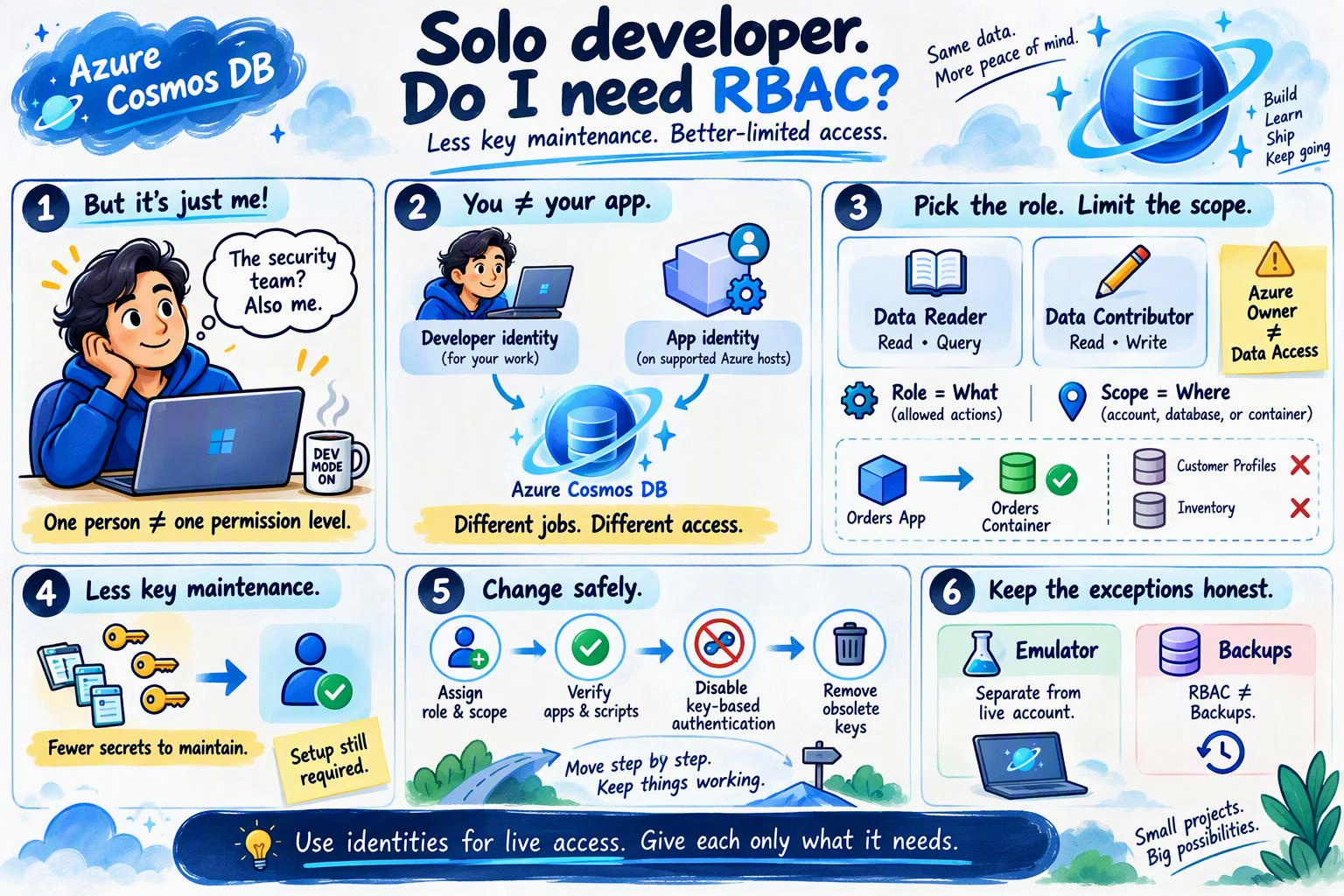
You do not need RBAC for your app to function; account keys still work while key-based authentication is enabled. But for a live Azure Cosmos DB for NoSQL project you intend to keep, identity-based access is the better default, even if you remain its only developer.
The reason is not team size. It is reducing the secrets you maintain and giving your code only the access it needs. Neither benefit requires a team hierarchy or an approval process.
Local tools that legitimately need the same developer access can use your existing sign-in. You do not need a new identity for every notebook, custom roles before you have a specific requirement, or pipeline identities when you do not have a pipeline.
The emulator’s development key is not a credential for your live account. Keep its environment separate, and do not treat an emulator exposed to other machines as automatically safe.
That is the stopping point: the identities your project actually uses, with the access they actually need.
For example, an app that reads and writes orders can use Data Contributor scoped to its orders container, rather than the whole account. Your developer identity might use the same role on a development database through a separate assignment. Same role, different identities and scopes.
These are data roles, not Azure’s Owner or Contributor roles for managing resources. Being Owner of the account does not automatically grant access to its items.
Post Updated on October 5, 2026 at 02:40PM
Thanks for reading
from devamazonaws.blogspot.com
Your app does not need all of your access
You might need to configure the account, investigate data, and run occasional maintenance. Your deployed app might need to read and write items in just one container. Those are different jobs, even if you do both. Suppose an account holds several of your projects. You can give this app’s identity a data role limited to its own database or container. It does not need access to another project’s data simply because you own both. If a bug makes it request data outside that scope, the permission boundary matters. That is a useful reason for a solo developer to separate access: your code should not inherit every permission you need to manage the project. There are two parts to this. Microsoft Entra ID authenticates the identity instead of your code supplying an account key. Cosmos DB’s data plane RBAC determines what that identity may do and where. Replacing the key and limiting permissions are separate benefits; using an identity with unnecessarily broad access only addresses the first.A key is quick to start with, but you keep maintaining it
Putting a key in a local.env file and keeping it out of source control is not the same as publishing it. That precaution matters. It does not remove the work of protecting and replacing the key wherever it is used.
Imagine rotating the key used by your app, then opening a notebook you last used a month ago. The app works; the notebook still has the old credential. You are now maintaining the connection between those copies as well as maintaining your code. No teammate was needed to create that chore.
Identity-based access removes that account key from those code paths. Your local tools can use your developer sign-in; an app on a supported Azure host can use a managed identity. SDK credential helpers handle obtaining access tokens rather than requiring you to supply an account key.
There is an upfront cost: sign in, assign a role, update the SDK configuration, and verify access. You may need to sign in again during local development, and permissions still need to be correct. This is not a promise of zero authentication work. It is a trade: initial identity setup instead of ongoing account-key handling.
The smallest setup that fits your project
Match the setup to where your code runs today, not to an organization you might build later.| Your situation | What you need |
|---|---|
| You only use the local emulator | Its development key, kept separate from live-account configuration. |
| Your code runs locally but connects to a live Cosmos DB account | Your existing developer identity, with a data role scoped to the work you need to do. |
| You deploy to an Azure host that supports managed identities | The app’s own managed identity and appropriately scoped data role, separate from your personal sign-in. |
Which role should I choose?
A role describes what an identity can do. A role assignment gives that identity the role at a scope: the account, a database, or a container.| If the identity needs to… | Choose this Cosmos DB data role |
|---|---|
| Read items and run queries, without changing data | Cosmos DB Built-in Data Reader |
| Read, create, update, and delete items | Cosmos DB Built-in Data Contributor |
What RBAC will not do for you
An identity with only Data Reader cannot modify items. Data Contributor, however, includes deleting them. If your app has permission to delete an item and a bug tells it to do so, RBAC does not know it was a mistake. A narrower scope limits which data an identity can reach; it does not undo damage within that scope. You still need to protect your developer sign-in, validate application behavior, and maintain appropriate backups. Identity-based access removes account-key handling, not every security or recovery responsibility.Already using keys? Change one working path first
Do not turn a working side project into an outage to prove a point. Move deliberately:- Switch one code path to identity-based access. Give its identity the appropriate data role and scope, then verify the reads and writes it actually needs.
- Cover the rest of the live-account dependencies. Include any deployed app, notebook, scheduled job, or maintenance script. A successful local test does not prove that those use the same identity or authentication method.
- Close the key path after verification. Once every dependency works with identity-based access, disable key-based authentication and remove obsolete live-account keys from configuration. Disabling keys affects the whole account.
Post Updated on October 5, 2026 at 02:40PM
Thanks for reading
from devamazonaws.blogspot.com

Comments
Post a Comment